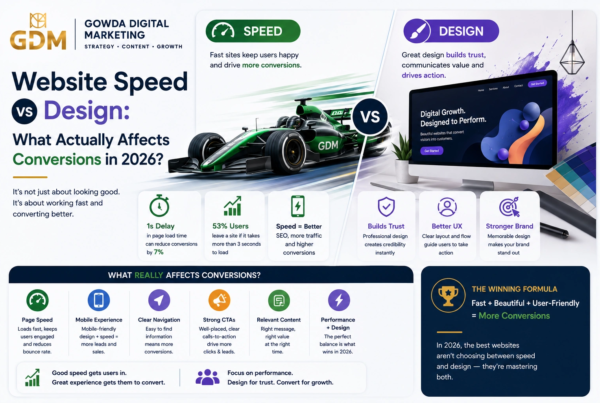

Introduction
Your website might be losing leads every day—and you may not even realize it.
A business website is no longer simply an online brochure. In 2026, it is often the first place a potential customer evaluates your business, compares your services, checks your credibility, reads reviews, and decides whether to contact you.
That means a website can either move visitors toward becoming customers or quietly push them toward your competitors.
A beautiful homepage alone does not guarantee conversions. A website can look modern and still suffer from slow loading, unclear messaging, weak calls to action, confusing navigation, poor mobile usability, missing trust signals, or technical SEO problems.
Google’s current guidance emphasizes overall page experience, including Core Web Vitals, secure pages, mobile usability, and avoiding intrusive experiences.
Why Does Website Performance Matter?
Imagine spending ₹50,000 on Google Ads or Meta Ads and sending those visitors to a website that takes too long to load.
Or imagine ranking on Google for an important service keyword, only for the visitor to land on a page that does not clearly explain what you offer.
Your marketing may be generating traffic.
Your website may be destroying the opportunity.
This is why website redesign should not be treated as a cosmetic exercise. The objective should be to create a website that is:
- Faster
- Easier to navigate
- Mobile-first
- Search-friendly
- Credible
- Accessible
- Clear about its value
- Designed around conversions
In this guide, you’ll discover 15 signs your business website may be costing you leads in 2026, along with practical recommendations for fixing each problem.
By the end, you’ll have a practical website redesign checklist you can use to decide whether you need:
- A few targeted improvements
- A UX and conversion optimization project
- A complete website redesign
What Is a Website Redesign?
A website redesign is the process of improving or rebuilding a website’s visual design, structure, content, user experience, technical performance, SEO, and conversion journey.
It does not necessarily mean throwing away everything and starting from zero.
Sometimes the right solution is a targeted redesign of:
- Homepage
- Service pages
- Landing pages
- Navigation
- Contact forms
- Calls to action
- Mobile experience
- Page speed
- Content structure
Other businesses may require a complete rebuild because the existing website is based on outdated technology or architecture.
Important: A website redesign should begin with data and business objectives—not simply a new color palette or trendy animation.
15 Signs Your Business Website Is Costing You Leads
1. Your Website Takes Too Long to Load
Speed is one of the first things to investigate.
If users have to wait before they can understand what your business does, some will leave before interacting with your content.
Google recommends a Largest Contentful Paint (LCP) of 2.5 seconds or less for a good user experience. Google also recommends an Interaction to Next Paint (INP) below 200 milliseconds and good visual stability through CLS.
Common causes of slow websites
- Oversized images
- Unoptimized videos
- Too many plugins
- Excessive JavaScript
- Poor hosting
- Render-blocking resources
- Unnecessary third-party scripts
- Poor caching
- Outdated themes or frameworks
What to do
Run important pages through Google’s PageSpeed Insights and identify the largest performance bottlenecks.
Redesign priority: HIGH
2. Your Website Looks Great on Desktop but Poor on Mobile
This is one of the biggest warning signs in 2026.
Google uses the mobile version of a website’s content for indexing and ranking under mobile-first indexing. Google also recommends responsive web design.
If your mobile website requires users to:
- Zoom in
- Swipe horizontally
- Fight tiny buttons
- Read microscopic text
- Navigate complicated menus
- Wait for oversized images
then your website needs attention.
Mobile redesign checklist
- Responsive layouts
- Large enough tap targets
- Readable typography
- Simple navigation
- Fast-loading images
- Mobile-friendly forms
- Visible CTAs
- Proper spacing
- No unnecessary pop-ups
Redesign priority: HIGH
3. Visitors Cannot Understand What You Do Within Seconds
A visitor should not have to study your homepage to understand your business.
Your above-the-fold section should quickly communicate:
What you do + who you help + why you’re different + what the visitor should do next.
Weak example
“Innovative Solutions for a Better Tomorrow”
This sounds professional but tells the visitor almost nothing.
Stronger example
“Performance-Driven Digital Marketing for Indian Small Businesses”
Now the visitor immediately understands the category and target audience.
Improve your homepage by answering:
- What do you offer?
- Who is it for?
- What problem do you solve?
- Why should visitors trust you?
- What should they do next?
Redesign priority: HIGH
4. Your Calls to Action Are Weak or Missing
A visitor may be interested in your service but still leave because you never clearly ask them to take action.
Weak CTAs include:
- Learn More
- Click Here
- Submit
- Explore
Better CTAs can be specific to the customer’s intent:
- Get a Free Website Audit
- Request a Project Quote
- Book a Strategy Call
- Get Your SEO Assessment
- Start Your Website Project
A strong CTA should be:
- Visible
- Specific
- Action-oriented
- Relevant to the page
- Easy to complete
Redesign priority: HIGH
5. Your Navigation Is Confusing
If users cannot quickly find your services, pricing, portfolio, contact information, or important resources, they may leave.
A complicated navigation menu can create unnecessary friction.
Good navigation typically makes important pages easy to find
For example:
Home → Services → Industries → Case Studies → About → Blog → Contact
The exact structure depends on the business, but the principle is simple:
Don’t make users work to understand your website.
Stanford’s research on web credibility found that usability and ease of navigation can influence perceptions of website credibility.
Redesign priority: HIGH
6. Your Website Looks Outdated Compared With Competitors
Your website doesn’t need to follow every design trend.
But it should look credible, current, and consistent with your market.
Signs of an outdated website include:
- Old typography
- Low-quality images
- Cluttered layouts
- Inconsistent spacing
- Outdated icons
- Excessive gradients or effects
- Broken layouts
- Old copyright dates
- Poor mobile design
- Generic stock photography
Important distinction
A redesign should not simply make your website “prettier.”
It should make it clearer and more effective.
Redesign priority: MEDIUM–HIGH
7. Your Website Has No Clear Trust Signals
Visitors are naturally cautious when considering a company they don’t know.
A website without trust signals may force users to ask:
“Can I trust this business?”
Useful trust elements include:
- Client logos
- Testimonials
- Case studies
- Reviews
- Certifications
- Awards
- Years of experience
- Team information
- Real photographs
- Business address
- Contact information
- Privacy policy
- Secure connection
Stanford’s web credibility research highlighted the importance of communicating the legitimacy and real-world presence of an organization.
Redesign priority: HIGH
8. Your Contact Forms Are Too Complicated
Every unnecessary form field can create friction.
If you only need:
- Name
- Phone
- Requirement
don’t ask visitors for 12 additional pieces of information.
Consider simplifying forms
Instead of:
Name → Company → Job Title → Industry → Revenue → Address → Website → Phone → Email → Budget → Project Details → Other
try:
Name → Email/Phone → What do you need help with?
You can collect additional information later.
Redesign priority: HIGH
9. Your Service Pages Are Too Thin
A common website problem is having one generic “Services” page that lists everything.
For SEO and conversions, important services often deserve dedicated pages.
For example, a digital marketing company might have:
- SEO Services
- Google Ads Management
- Meta Ads Management
- Website Development
- Social Media Marketing
- Local SEO
Each page can then address:
- Customer problem
- Service benefits
- Process
- Deliverables
- Examples
- FAQs
- Testimonials
- CTA
Why this matters
Dedicated service pages give potential customers more relevant information and create more opportunities to target search intent.
Redesign priority: HIGH
10. Your Website Is Not Built Around Search Intent
SEO isn’t just about inserting keywords.
A page should satisfy what the searcher actually wants.
For example:
Search: “website development company Bangalore”
The visitor may want:
- Services
- Portfolio
- Pricing information
- Process
- Location
- Testimonials
- Contact options
If your page only contains 500 words of generic marketing copy, it may not satisfy the visitor’s intent.
SEO redesign checklist
Check:
- Page titles
- Meta descriptions
- H1 headings
- H2/H3 structure
- Internal links
- Image alt text
- URLs
- Structured data where appropriate
- Search intent
- Content depth
- Local SEO information
Redesign priority: HIGH
11. Your Website Has Poor Core Web Vitals
Core Web Vitals are particularly important when evaluating modern website performance.
Google identifies three key metrics:
| Metric | What It Measures | Recommended Target |
| LCP | Loading performance | ≤ 2.5 seconds |
| INP | Responsiveness | < 200 ms |
| CLS | Visual stability | < 0.1 |
These thresholds come from Google’s current Core Web Vitals guidance.
What causes poor scores?
LCP problems
- Large hero images
- Slow server response
- Render-blocking resources
INP problems
- Heavy JavaScript
- Complex interactions
- Excessive third-party scripts
CLS problems
- Images without dimensions
- Dynamically injected content
- Unstable advertisements or embeds
Redesign priority: HIGH
12. Your Content Is Full of Jargon
Your customers may not understand industry terminology.
For example:
“We leverage omnichannel digital transformation ecosystems to optimize your business’s performance architecture.”
Sounds impressive.
But:
“We help small businesses get more customers through SEO, Google Ads, and conversion-focused websites.”
is much easier to understand.
Use customer-focused language
Instead of describing what your company is, explain what your company does for the customer.
Ask:
“Would a first-time visitor understand this sentence?”
If not, rewrite it.
Redesign priority: MEDIUM–HIGH
13. Your Website Does Not Show Proof of Results
Businesses frequently say:
“We deliver excellent results.”
But potential customers want evidence.
Replace generic claims with proof.
Example
Instead of:
“We help businesses grow online.”
Use:
“Helped a local service business increase qualified enquiries after rebuilding its website and improving Google Ads landing pages.”
Even better:
- Before
- Problem
- Strategy
- Implementation
- Result
Use case studies
A case study can include:
Challenge → Strategy → Execution → Result → Testimonial
Redesign priority: HIGH
14. Your Website Has Technical or Accessibility Problems
A website should work for as many users as reasonably possible.
Common issues include:
- Missing alt text
- Poor color contrast
- Keyboard navigation problems
- Inaccessible forms
- Missing labels
- Poor heading structure
- Unclear focus states
- Small clickable elements
The Web Content Accessibility Guidelines (WCAG) 2.2 provide an internationally recognized framework for making web content more accessible. W3C organizes the guidelines around four principles: perceivable, operable, understandable, and robust.
Accessibility improvements often benefit everyone—not only users with disabilities.
Redesign priority: HIGH
15. You Have Traffic but Very Few Leads
This may be the biggest warning sign.
Imagine your website receives:
10,000 monthly visitors
but generates only:
20 qualified enquiries.
The problem may not be traffic.
It may be conversion efficiency.
Investigate:
- Landing pages
- CTA placement
- Messaging
- Forms
- Trust signals
- Pricing clarity
- Service pages
- Mobile experience
- Page speed
- User journeys
- Analytics tracking
A website redesign should ultimately connect design decisions to business outcomes.
Redesign priority: VERY HIGH
Key Facts: 2026 Website Performance Box
📊 WEBSITE REDESIGN FACTS
Google recommends:
LCP ≤ 2.5 seconds, INP < 200 milliseconds, and CLS < 0.1 for good Core Web Vitals performance.
Google’s indexing:
Google uses the mobile version of a website’s content for indexing and ranking.
Accessibility:
WCAG 2.2 is the current W3C recommendation for web accessibility guidance.
Key takeaway:
Website redesign is no longer just about aesthetics. Performance, mobile usability, accessibility, content, credibility, SEO, and conversion experience all matter.
Website Redesign vs Website Refresh
Not every website needs to be rebuilt from scratch.
| Situation | Website Refresh | Full Redesign |
| Minor visual issues | ✅ | |
| New colors/fonts | ✅ | |
| A few UX problems | ✅ | |
| Slow website architecture | ✅ | |
| Outdated CMS | ✅ | |
| Poor mobile experience | ✅ | |
| Weak conversion journey | ✅ | |
| Major SEO restructuring | ✅ | |
| Poor technical foundation | ✅ | |
| Rebranding | Sometimes | ✅ |
| Major business repositioning | ✅ |
When should you choose a refresh?
Choose a refresh when your existing website has a solid technical foundation but needs targeted improvements.
When should you choose a redesign?
Choose a redesign when multiple parts of the website are failing simultaneously.
A Simple Website Redesign Audit Process
Step 1: Review Your Analytics
Look at:
- Traffic
- Landing pages
- Engagement
- Conversion rate
- Form submissions
- Device breakdown
- Traffic sources
- Top exit pages
Don’t redesign based only on personal opinion.
Step 2: Test the Website on Mobile
Open your website on several phones.
Check:
- Navigation
- Text size
- Buttons
- Forms
- Images
- Speed
- Horizontal scrolling
- Pop-ups
Google recommends responsive design as a practical approach for mobile-friendly websites.
Step 3: Test Page Speed
Run key pages through PageSpeed Insights.
Prioritize pages such as:
- Homepage
- Main service page
- Highest-traffic landing page
- Contact page
- Top blog posts
- Paid advertising landing pages
Step 4: Conduct a Competitor Review
Choose three to five competitors.
Compare:
| Area | Your Website | Competitor A | Competitor B |
| Messaging | |||
| Mobile UX | |||
| CTA | |||
| Services | |||
| Testimonials | |||
| Case Studies | |||
| Speed | |||
| Navigation | |||
| Content |
The objective isn’t to copy competitors.
It is to identify expectations your customers already have.
Step 5: Map the Customer Journey
A typical journey might look like:
Google Search / Ad → Landing Page → Value Proposition → Proof → Service Details → CTA → Form → Thank You Page → Sales Follow-Up
Step-by-Step Visual
TRAFFIC
↓
LANDING PAGE
↓
CLEAR VALUE PROPOSITION
↓
BENEFITS + SOLUTION
↓
TRUST + SOCIAL PROOF
↓
STRONG CTA
↓
LOW-FRICTION FORM
↓
LEAD
↓
SALES FOLLOW-UP
If visitors are consistently dropping between two stages, investigate that stage before redesigning everything.
Example: How a Redesign Can Improve Lead Generation
Consider a hypothetical local service company receiving:
5,000 website visitors/month
Before redesign:
- 5,000 visitors
- 1.2% enquiry rate
- 60 enquiries
- 20 qualified leads
After improving:
- Mobile UX
- Homepage messaging
- Service pages
- Trust signals
- CTA placement
- Contact form
- Page speed
Suppose the enquiry rate increases to 2.2%.
That produces:
110 enquiries
instead of:
60 enquiries
The example is hypothetical, but it illustrates an important principle:
You don’t always need dramatically more traffic to generate more leads. Sometimes you need to convert more of the traffic you already have.
Expert Perspective: Design Should Serve the User
Stanford’s web credibility research found that usability and professional presentation can influence perceptions of credibility. Its research also identified the importance of avoiding small errors that can damage perceptions of professionalism.
This supports a broader principle for website redesign:
Good design is not decoration. It reduces uncertainty, communicates value, builds trust, and makes the next action easier.
2026 Website Redesign Checklist
Use this checklist before deciding whether your website needs a redesign.
Performance
- Website loads quickly
- Core Web Vitals are healthy
- Images are optimized
- Unnecessary scripts are removed
- Hosting performs reliably
Mobile
- Website is responsive
- Navigation works well on mobile
- Buttons are easy to tap
- Text is readable
- Forms work properly
- Mobile content matches important desktop content
Messaging
- Homepage clearly explains what the company does
- Target audience is obvious
- Benefits are clear
- Differentiators are communicated
- Calls to action are specific
Conversion
- CTAs are visible
- Forms are simple
- Contact information is easy to find
- Trust signals are visible
- Testimonials are included
- Case studies demonstrate results
SEO
- Each important page targets a clear search intent
- Titles are optimized
- Meta descriptions are useful
- Heading structure is logical
- Internal linking is strong
- Images have useful alt text
- Important pages are indexable
Accessibility
- Images have appropriate alternatives
- Forms are accessible
- Keyboard navigation works
- Contrast is sufficient
- Heading hierarchy is logical
- Focus states are visible
W3C’s WCAG 2.2 guidance can be used as the technical reference for accessibility improvements.
10 FAQs
1. How often should a business redesign its website?
There is no universal schedule. A website should be redesigned when its technology, UX, performance, branding, SEO, or conversion performance no longer supports business objectives.
For many businesses, reviewing the website every year and conducting a deeper audit every two to three years is sensible.
2. What are the biggest signs that a website needs a redesign?
The most serious warning signs include poor mobile UX, slow loading, outdated design, confusing navigation, weak messaging, poor conversion rates, broken functionality, weak trust signals, and declining organic performance.
3. Does redesigning a website improve SEO?
It can, but redesigning a website does not automatically improve rankings.
SEO benefits can come from better technical performance, information architecture, content, mobile usability, internal linking, and crawlability.
However, poorly managed redesigns can also cause SEO losses. URL changes, missing redirects, deleted content, broken internal links, and incorrect indexing directives must be handled carefully.
4. How much does a website redesign cost in India?
The cost varies significantly depending on the number of pages, technology, functionality, content requirements, integrations, branding, SEO work, and whether the website is custom-built.
A small business website refresh can cost far less than a custom website with advanced functionality.
The correct approach is to define the business requirements before setting a redesign budget.
5. Should I redesign my website or build a new one?
If your existing technical foundation is strong, a redesign may be sufficient.
If your CMS, codebase, architecture, performance, or functionality is outdated, rebuilding may be more efficient.
6. Is mobile-first web design really necessary in 2026?
Yes.
Google uses mobile versions of website content for indexing and ranking, making mobile usability an essential consideration for modern websites.
7. What should a high-converting homepage include?
A strong homepage generally includes:
- Clear value proposition
- Primary CTA
- Key benefits
- Services
- Differentiators
- Social proof
- Testimonials
- Case studies or results
- FAQs
- Contact opportunity
The exact structure depends on the business and audience.
8. How do I know whether my website is actually losing leads?
Compare website traffic against measurable conversion actions.
Track:
- Form submissions
- Calls
- WhatsApp clicks
- Email enquiries
- Bookings
- Purchases
- Quote requests
Then compare performance by landing page, device, traffic source, and campaign.
9. Can a website redesign hurt SEO?
Yes.
A redesign can cause SEO problems if URLs change without redirects, valuable content disappears, metadata is lost, internal links break, pages become inaccessible to search engines, or the new architecture is poorly planned.
SEO should therefore be part of the redesign process from the beginning—not added after launch.
10. What should I do before redesigning my website?
Start with an audit.
Review:
- Analytics
- Search performance
- Conversion data
- Mobile UX
- Page speed
- Existing content
- Technical SEO
- Competitors
- Customer feedback
- Business goals
Then prioritize the highest-impact problems.
When Should You Redesign Your Website?
You should consider redesigning your website when it is slow, difficult to use on mobile, outdated, difficult to navigate, unclear about your services, lacking trust signals, poorly optimized for search, inaccessible, or generating significantly fewer leads than expected.
A redesign is especially worthwhile when several of these problems occur simultaneously and the existing website architecture makes improvement difficult.
Website Redesign: 15 Signs at a Glance
| # | Warning Sign | Lead Risk | Priority |
| 1 | Slow loading | High | 🔴 |
| 2 | Poor mobile UX | High | 🔴 |
| 3 | Unclear messaging | High | 🔴 |
| 4 | Weak CTAs | High | 🔴 |
| 5 | Confusing navigation | High | 🔴 |
| 6 | Outdated design | Medium–High | 🟠 |
| 7 | No trust signals | High | 🔴 |
| 8 | Complicated forms | High | 🔴 |
| 9 | Thin service pages | High | 🔴 |
| 10 | Poor search intent alignment | High | 🔴 |
| 11 | Poor Core Web Vitals | High | 🔴 |
| 12 | Excessive jargon | Medium | 🟠 |
| 13 | No proof of results | High | 🔴 |
| 14 | Accessibility problems | Medium–High | 🟠 |
| 15 | Traffic but few leads | Very High | 🔴 |
Don’t Redesign Just Because Your Website Looks Old
A website redesign should solve a business problem.
Before investing in a new website, identify what is currently preventing visitors from becoming customers.
If the problem is messaging, fix messaging.
If the problem is speed, fix performance.
If the problem is mobile UX, redesign the mobile experience.
If the problem is conversion, improve the customer journey.
Design changes should support measurable business outcomes.
Your Website Redesign To-Do List
This Week
- Test your website on mobile
- Run your homepage through PageSpeed Insights
- Check your top landing pages
- Review website analytics
- Identify your highest-exit pages
- Test every important form
- Check all major CTAs
- Review your navigation
- Compare your website with three competitors
- List your top five website problems
Before Starting a Redesign
- Define business goals
- Define conversion goals
- Identify target customers
- Audit SEO
- Audit content
- Audit technical performance
- Map customer journeys
- Create website architecture
- Plan redirects if URLs change
- Establish success metrics
After Launch
- Test forms
- Test mobile layouts
- Test redirects
- Check indexing
- Check analytics
- Check Search Console
- Test page speed
- Monitor conversions
- Collect user feedback
- Compare performance against the old website
Key Takeaways
A website redesign should not begin with:
“What design do we like?”
It should begin with:
“What is preventing our website from generating better business results?”
The biggest warning signs include:
- Slow loading
- Poor mobile experience
- Unclear messaging
- Weak CTAs
- Confusing navigation
- Outdated design
- Missing trust signals
- Complicated forms
- Thin service pages
- Weak search intent alignment
- Poor Core Web Vitals
- Excessive jargon
- Lack of proof
- Accessibility problems
- Low conversion despite healthy traffic
If you identify several of these problems, your website may be doing more than looking outdated.
It may be actively costing your business leads.
Conclusion
Your website is one of the most important assets in your digital marketing system.
It supports SEO.
It receives paid traffic.
It introduces your brand.
It answers customer questions.
It builds trust.
And, most importantly, it can turn anonymous visitors into measurable business opportunities.
But simply having a website is not enough in 2026.
Visitors expect websites to be fast, mobile-friendly, accessible, easy to understand, trustworthy, and easy to use.
Google’s current guidance reinforces the importance of mobile accessibility, strong page experience, and healthy Core Web Vitals, while W3C’s WCAG 2.2 provides a modern framework for accessibility.
So before spending more money driving traffic to your website, ask a more important question:
“Is my website ready to convert that traffic?”
If the answer is no, a strategic redesign may deliver more value than simply increasing your advertising budget.
🚀 Is Your Website Costing You Leads?
If you’re unsure whether your business website needs a redesign, start with an audit.
Gowda Digital Marketing can help identify opportunities across:
- Website design
- UX
- SEO
- Page speed
- Mobile optimization
- Landing pages
- Conversion optimization
- Lead generation
Want more practical digital marketing and website growth strategies? Subscribe to the Gowda Digital Marketing newsletter.
And if you found this checklist useful, leave a comment below:
Which of these 15 website problems does your business currently have?
References & Sources
- Google Search Central — Understanding Core Web Vitals and Google Search Results
Google Search Central: Core Web Vitals - Google Search Central — Understanding Page Experience
Google Search Central: Page Experience - Google Search Central — Mobile Site and Mobile-First Indexing Best Practices
Google Search Central: Mobile-First Indexing - W3C — Web Content Accessibility Guidelines (WCAG) 2.2
W3C: WCAG 2.2 - W3C — WCAG 2 Overview
W3C: WCAG Overview - Stanford Web Credibility Research
Stanford Web Credibility Research