
You don’t need to post every day without a plan—you need 30 days of purposeful content that gives your audience a reason to notice, trust, remember, and eventually choose your business.
Introduction
Running a small business already means managing customers, sales, operations, finances, employees, suppliers, and dozens of unexpected tasks.
Then social media enters the picture.
You know your business should be active on Instagram, Facebook, LinkedIn, YouTube Shorts, or other platforms, but one question keeps coming back:
“What should I post today?”
That question can quickly turn social media into a stressful daily task.
A content calendar solves this problem.
Instead of opening Instagram every morning and trying to invent something interesting, you can plan your content around specific goals: educating your audience, demonstrating expertise, showing your products, answering questions, sharing customer experiences, creating conversations, and generating enquiries.
This 30-day social media content calendar is designed specifically for small businesses that want a practical system rather than a complicated marketing strategy.
It can be adapted for:
- Local businesses
- Service businesses
- Restaurants and cafés
- Salons and beauty businesses
- Real estate businesses
- Coaches and consultants
- Professional services
- E-commerce brands
- Freelancers
- Startups
- Clinics and wellness businesses
- Retail stores
- Home-based businesses
Why a 30-Day Social Media Calendar Matters
The biggest social media problem for many small businesses isn’t a lack of ideas.
It is inconsistency.
A business may publish five posts in one week, disappear for two weeks, return with a promotional post, and then wonder why engagement is weak.
A calendar creates structure.
It helps you:
- Plan content in advance
- Maintain a consistent publishing rhythm
- Reduce last-minute content creation
- Balance promotional and educational posts
- Reuse content across platforms
- Create stronger calls to action
- Build trust over time
- Track which topics perform best
- Turn customer questions into content
- Spend less time wondering what to post
Google’s current guidance emphasizes helpful, reliable, people-first content and specifically encourages original information, first-hand expertise, and content that genuinely satisfies visitors.
That principle applies to social media too.
Content should not exist simply because your business needs to “post something.” It should exist because your audience has a reason to care.
Promise of Value
By the end of this guide, you will have:
- A complete 30-day content calendar.
- A mix of educational, entertaining, promotional, and trust-building posts.
- Daily content prompts.
- Recommended formats for each day.
- CTA ideas.
- A simple weekly content structure.
- A repurposing system.
- A measurement checklist.
- 10 frequently asked questions.
- Ideas for turning your content strategy into a repeatable marketing system.
What Makes a Good Social Media Content Calendar?
A good content calendar isn’t simply a list of dates.
It connects content → audience problem → business goal → action.
For example:
Bad approach:
“Post a picture of our product.”
Better approach:
“Show three common mistakes customers make when choosing this product, explain how to avoid them, and invite followers to ask questions.”
The second idea provides value before asking for a sale.
A strong content calendar should contain:
- Educational content
- Social proof
- Behind-the-scenes content
- Product or service demonstrations
- Customer-focused content
- Engagement posts
- Brand personality
- Promotional content
- Frequently asked questions
- Strong calls to action
The 4 Content Pillars for Small Businesses
Before creating your 30-day calendar, divide your content into four basic pillars.
1. Educate
Teach people something useful.
Examples:
- Tips
- Tutorials
- Mistakes
- How-to posts
- Checklists
- Industry insights
- FAQs
Goal: Build authority.
2. Build Trust
Show people the humans and experiences behind your business.
Examples:
- Customer testimonials
- Reviews
- Team introductions
- Behind-the-scenes content
- Business story
- Case studies
- Before-and-after examples
Goal: Reduce uncertainty.
3. Engage
Give your audience something to respond to.
Examples:
- Polls
- Questions
- This-or-that posts
- Quizzes
- Opinions
- “Choose one” posts
- Story Q&As
Goal: Increase interaction and learn about your audience.
4. Convert
Give people a reason to take the next step.
Examples:
- Product offers
- Service packages
- Free consultations
- Demos
- Limited-time promotions
- Lead magnets
- Booking links
Goal: Generate enquiries, leads, bookings, or sales.
The 30-Day Social Media Content Calendar
Here is the complete 30-day plan.
| Day | Content Idea | Format | Primary Goal | CTA |
| 1 | Introduce your business | Reel/Post | Awareness | Follow for more |
| 2 | Common customer problem | Carousel | Education | Save this |
| 3 | Behind the scenes | Reel/Story | Trust | Ask a question |
| 4 | Customer FAQ | Carousel | Education | Comment your question |
| 5 | Customer testimonial | Post/Reel | Trust | DM us |
| 6 | Quick industry tip | Reel | Education | Share this |
| 7 | Weekly recap | Stories | Engagement | Vote in poll |
| 8 | Product/service feature | Reel | Awareness | Learn more |
| 9 | Myth vs fact | Carousel | Education | Save this |
| 10 | Team introduction | Photo/Reel | Trust | Say hello |
| 11 | Before-and-after | Carousel/Reel | Proof | DM for details |
| 12 | “3 mistakes” post | Carousel | Education | Avoid these |
| 13 | Customer question | Story Q&A | Engagement | Send a question |
| 14 | Soft promotion | Reel/Post | Conversion | Enquire today |
| 15 | Your business story | Reel | Connection | Share your story |
| 16 | How-to tutorial | Reel | Education | Save for later |
| 17 | Industry statistic/fact | Carousel | Authority | Share this |
| 18 | Customer review | Graphic/Reel | Trust | Contact us |
| 19 | Day-in-the-life | Reel/Stories | Personality | Follow along |
| 20 | This-or-that question | Story | Engagement | Vote |
| 21 | Weekly FAQ | Carousel | Education | Comment below |
| 22 | Product/service comparison | Carousel | Education | Which would you choose? |
| 23 | Common misconception | Reel | Authority | Tag someone |
| 24 | Business values | Post/Reel | Trust | What matters to you? |
| 25 | Mini case study | Carousel | Proof | DM to discuss |
| 26 | Quick tip | Reel | Education | Save this |
| 27 | User-generated/customer content | Post/Story | Trust | Tag us |
| 28 | Limited offer | Reel/Story | Conversion | Book/contact today |
| 29 | Ask your audience | Story/Post | Engagement | Comment below |
| 30 | Monthly recap + next step | Reel/Carousel | Conversion | Follow/Subscribe |
Day-by-Day Content Strategy
Day 1 — Introduce Your Business
Start the month by explaining who you are.
Include:
- What your business does
- Who you help
- What problem you solve
- Where you operate
- What makes you different
Example CTA:
“Follow us for practical tips, updates, and helpful ideas.”
Day 2 — Solve a Common Customer Problem
Identify one problem your target customer frequently experiences.
Explain:
- What causes the problem.
- Why it matters.
- What they can do about it.
This is an excellent carousel topic.
Day 3 — Go Behind the Scenes
Show something customers normally don’t see.
For example:
- Preparing an order
- Designing a project
- Setting up a store
- Preparing a meal
- Planning a campaign
- Packaging products
- Meeting your team
Why it works: It makes a business feel more human.
Day 4 — Answer a Frequently Asked Question
Look at the questions customers repeatedly ask.
Turn one into a post.
Template:
Question: “How long does it take?”
Answer: Explain clearly.
Extra tip: Add one useful detail customers may not know.
Day 5 — Share a Customer Testimonial
Social proof can help prospective customers feel more confident.
Use:
- Written review
- Video testimonial
- Screenshot with permission
- Before-and-after result
- Customer story
Always obtain appropriate permission before publishing customer information or images.
Day 6 — Share One Quick Tip
Keep this simple.
Examples:
- One productivity tip
- One financial tip
- One maintenance tip
- One beauty tip
- One marketing tip
- One purchasing tip
Short-form video is ideal for this format.
Day 7 — Weekly Recap
Use Stories to summarize the week.
Try:
Monday: Tip
Tuesday: FAQ
Wednesday: Behind the scenes
Thursday: Customer result
Friday: Offer
Weekend: Poll
Then ask:
“Which post helped you most this week?”
Week 2: Demonstrate Expertise
Day 8 — Product or Service Feature
Don’t simply list features.
Explain the benefit.
Instead of:
“Our software has automated reminders.”
Try:
“Never forget to follow up with a customer again—our automated reminders help you stay on top of important follow-ups.”
Day 9 — Myth vs Fact
Create a simple carousel.
Slide 1: Myth
Slide 2: The truth
Slide 3: Why the myth exists
Slide 4: What customers should actually do
Day 10 — Introduce Your Team
Introduce one person.
Include:
- Name
- Role
- Experience
- Favorite part of the job
- One fun fact
People often connect with people before they connect with logos.
Day 11 — Before and After
If your business creates visible transformations, this format can be extremely useful.
Examples:
- Interior design
- Fitness
- Cleaning
- Beauty
- Photography
- Web design
- Landscaping
- Product restoration
Explain what changed and how the result was achieved.
Day 12 — Three Common Mistakes
Use this formula:
“3 mistakes people make when ______.”
Then explain each mistake.
Finish with:
“Save this before you make your next decision.”
Day 13 — Audience Q&A
Use Instagram Stories or another interactive format.
Ask:
“What is one thing you’ve always wanted to know about our business?”
Collect answers and turn them into future posts.
Day 14 — Soft Promotion
Promotion doesn’t have to feel aggressive.
Instead of:
“BUY NOW!!!”
Try:
“Need help with [problem]? Our [service/product] is designed to help you [benefit]. Send us a message to learn more.”
Week 3: Build Connection
Day 15 — Tell Your Business Story
Explain:
- Why you started
- What problem inspired you
- What you learned
- What your business believes
- Where you’re going next
Storytelling helps transform a company from a name into a recognizable brand.
Day 16 — Create a Tutorial
Show people how to do something.
Use:
Problem → Steps → Result
For example:
“How to prepare your home before a professional cleaning service arrives.”
Day 17 — Share an Industry Fact
Use a reliable source.
Don’t post statistics simply because they sound impressive.
Explain why the fact matters to your customer.
Google recommends that content demonstrate accuracy, relevance, originality, and useful context rather than simply repeating information available elsewhere.
Day 18 — Share Another Customer Result
Use a different testimonial format from Day 5.
For example:
- Day 5: Written review
- Day 18: Short customer video
- Day 25: Full case study
This creates variety without requiring a completely new content strategy.
Day 19 — Day in the Life
Show what a normal business day looks like.
Don’t overproduce it.
Authentic footage from:
- Opening the shop
- Preparing equipment
- Meeting customers
- Creating products
- Delivering orders
- Working with your team
can be enough.
Day 20 — This or That
Create a simple choice.
Examples:
A or B?
Morning or evening?
Traditional or modern?
Product A or Product B?
The goal is conversation, not complexity.
Day 21 — Weekly FAQ
Collect three questions from customers.
Answer all three in one carousel.
This also creates a reusable FAQ library for your website.
Week 4: Turn Attention Into Business
Day 22 — Product or Service Comparison
Help customers make a decision.
| Option | Best For | Main Benefit | Consider If |
| Basic | Beginners | Lower commitment | You need essentials |
| Standard | Growing customers | Balanced value | You need more features |
| Premium | Advanced needs | Maximum support | You want a complete solution |
Avoid misleading comparisons. Be transparent about pricing, limitations, and suitability.
Day 23 — Correct a Common Misconception
Start with:
“Think ______? Here’s what you should know.”
Then explain the reality.
This can establish authority while helping customers make better decisions.
Day 24 — Share Your Business Values
Talk about what your business stands for.
Examples:
- Quality
- Transparency
- Customer service
- Sustainability
- Speed
- Local community
- Innovation
Don’t just list values.
Show how they influence your decisions.
Day 25 — Publish a Mini Case Study
Use:
Challenge → Solution → Result → Lesson
Example:
A local service business struggled with inconsistent enquiries. We reorganized its social content around customer problems, educational posts, testimonials, and clear CTAs. Over the following weeks, the business had a more structured way to communicate its services and identify which topics generated the strongest audience response.
Use your own verified client data whenever possible rather than inventing performance numbers.
Day 26 — Another Quick Tip
Make this one extremely easy to consume.
One problem.
One solution.
One CTA.
For example:
“Save this before you create your next Instagram post.”
Day 27 — Share Customer or User-Generated Content
If a customer has tagged your business, ask for permission to repost it.
UGC can include:
- Customer photos
- Customer videos
- Reviews
- Product demonstrations
- Unboxing videos
- Customer stories
Day 28 — Create a Clear Offer
Now make the sales message stronger.
Your CTA could be:
- Book a consultation
- Request a quote
- Visit our store
- Send a WhatsApp message
- Schedule a demo
- Download the guide
- Contact our team
Make the next step obvious.
Day 29 — Ask Your Audience What They Want
Ask:
“What should we create next?”
Give people choices.
For example:
A. More tutorials
B. More behind-the-scenes
C. More product tips
D. More customer stories
Your audience is effectively helping you build next month’s content calendar.
Day 30 — Monthly Recap
Finish the month by summarizing:
- What you learned
- Best-performing content
- Customer questions
- Business milestones
- Helpful resources
- What’s coming next
Then invite people to continue the relationship.
CTA:
“Follow us for next month’s content and subscribe to our newsletter for practical business and marketing tips.”
A Simple Weekly Content Structure
If creating 30 different ideas feels overwhelming, use this repeatable formula:
Monday — Educate
Teach something.
Tuesday — Engage
Ask something.
Wednesday — Show
Demonstrate your product, service, or process.
Thursday — Build Trust
Share a review, story, result, or behind-the-scenes moment.
Friday — Convert
Present an offer or next step.
Saturday — Humanize
Show your team, personality, or business culture.
Sunday — Reflect
Use Stories, polls, recaps, or lighter content.
This structure can be reused every month.
Step-by-Step Visual: The Content Creation Workflow
Use this simple process:
CUSTOMER PROBLEM
↓
CONTENT IDEA
↓
CHOOSE FORMAT
↓
CREATE HOOK
↓
DELIVER VALUE
↓
ADD CTA
↓
PUBLISH
↓
RESPOND TO COMMENTS
↓
MEASURE RESULTS
↓
REUSE WHAT WORKED
The most important step is the first one.
Start with the customer—not the platform.
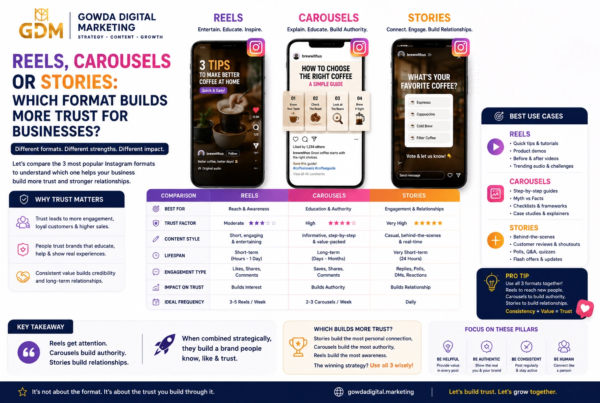
Content Format Comparison
| Format | Best For | Strength | Example |
| Reel/Short Video | Reach | Visual storytelling | Quick tutorial |
| Carousel | Education | Detailed information | 5 mistakes |
| Story | Engagement | Fast interaction | Poll |
| Static Image | Branding | Simple communication | Quote/testimonial |
| Live Video | Connection | Real-time interaction | Q&A |
| Long Video | Education | Detailed explanation | Tutorial |
| Blog | Search/Education | Evergreen information | Complete guide |
Don’t assume that one format will work equally well for every business.
Test different formats and measure the results.
How to Adapt This Calendar for Different Businesses
Local Restaurant
Replace generic posts with:
- Today’s special
- Kitchen behind the scenes
- Chef introduction
- Customer review
- Food preparation
- Menu explanation
- Location-based content
- Customer poll
Real Estate Business
Use:
- Property tours
- Buyer mistakes
- Market education
- Neighborhood guides
- Client stories
- Home-buying FAQs
- Property comparisons
Salon
Use:
- Hair-care tips
- Transformations
- Stylist introductions
- Product recommendations
- Client reviews
- Before-and-after content
- Appointment reminders
Digital Marketing Agency
Use:
- Marketing tips
- Case studies
- SEO explanations
- Social media mistakes
- Client results
- Behind-the-scenes strategy
- Content audits
Key Facts & Statistics Box
📊 Key Facts for Content Marketers
Fact 1: Google states that there is no preferred word count that automatically makes content rank better. Quality and usefulness matter more than hitting an arbitrary word target.
Fact 2: Google’s current guidance emphasizes original, valuable, non-commodity content and first-hand expertise.
Fact 3: Google’s guidance says the same foundational SEO practices remain relevant for AI-powered Search experiences.
Fact 4: DataReportal’s Digital 2026: India reporting provides current data on internet, mobile, and social media usage in India, including platform-level audience information.
Takeaway: Don’t create content simply to increase your posting volume. Create content that is useful to the people you want to attract.
Expert Opinion
Google Search Central’s guidance provides an important principle for modern content marketing:
“Create valuable, non-commodity content for your audience.”
For a small business, this means your advantage isn’t necessarily having the biggest production budget.
Your advantage can be specificity.
A local business knows its customers.
It knows the questions they ask.
It knows the mistakes they make.
It knows the products they compare.
It knows what customers worry about before purchasing.
Those real experiences can become your most valuable content.
Don’t Chase Virality
💡 Remember
10,000 views from the wrong audience can be less valuable than 500 views from people who actually need your product or service.
Measure content by business relevance—not just views.
Useful metrics include:
- Saves
- Shares
- Comments
- Profile visits
- Website clicks
- Enquiries
- Leads
- Bookings
- Sales
Case Study Example: A Local Service Business
Imagine a fictional home-services company called ABC Home Care.
Before using a calendar, it posts:
- Random promotional graphics
- Occasional product photos
- Festival greetings
- Discount announcements
The result is inconsistent communication.
The business then changes its content mix:
Week 1: Customer problems
Week 2: Educational tips
Week 3: Reviews and behind-the-scenes content
Week 4: Case studies and offers
Instead of constantly saying:
“Hire us.”
the business begins answering:
- What problem does the customer have?
- Why does it happen?
- How can they prevent it?
- What should they look for?
- How does professional help work?
- What results have other customers experienced?
The social profile now becomes an educational resource as well as a sales channel.
Important: This is a strategic example, not a claim of measured results. Replace it with verified client data when publishing a real case study.
Common Social Media Content Mistakes
1. Posting Only Promotional Content
If every post says “Buy now,” people have little reason to follow you.
Use a mix of:
Teach + Help + Entertain + Prove + Sell
2. Copying Competitors
Competitor research is useful.
Copying their content isn’t.
Your advantage is your own:
- Experience
- Customers
- Opinions
- Processes
- Stories
- Results
- Expertise
Google specifically encourages original information and added value rather than simply rewriting what already exists online.
3. Ignoring Comments
Social media is social.
If people comment, respond.
A comment can also become your next content idea.
4. Obsessing Over Follower Count
A follower is not automatically a customer.
Track business outcomes as well as audience growth.
5. Creating Without a CTA
Every post doesn’t need a sales CTA.
But your audience should understand what to do next.
Possible CTAs:
- Save this
- Share this
- Comment below
- Follow for more
- Send us a DM
- Visit our website
- Book a consultation
- Download the guide
What Should a Small Business Post on Social Media?
A small business should post a balanced mix of educational tips, customer stories, behind-the-scenes content, product or service demonstrations, FAQs, engaging questions, testimonials, industry insights, and promotional offers. A practical 30-day calendar can organize these topics so the business consistently educates, builds trust, engages its audience, and generates enquiries.
10 FAQs
1. How often should a small business post on social media?
There is no universal number that works for every business. Start with a schedule your team can maintain consistently. For many small businesses, several quality posts per week combined with regular Stories or short-form updates can be more sustainable than trying to create large volumes of content.
2. Do I need to post every day?
No.
A 30-day calendar doesn’t necessarily mean publishing 30 feed posts.
Some days can be:
- Stories
- Polls
- Comments
- Community engagement
- Content creation
- Repurposing
- Analytics review
Consistency matters more than forcing low-quality daily posts.
3. What should I post if I have no ideas?
Start with customer questions.
Write down the 20 questions your customers ask most often.
Each question can become:
- A Reel
- A carousel
- A Story
- A blog
- An FAQ
- A LinkedIn post
- An email
4. Should small businesses use Reels?
Short-form video can be useful, especially for demonstrations, tutorials, transformations, FAQs, and behind-the-scenes content.
But don’t choose a format simply because it is popular.
Choose the format that communicates your idea effectively.
5. Should every post sell something?
No.
A healthy content strategy should provide value before repeatedly asking for a purchase.
Use educational and trust-building content alongside promotional posts.
6. What is the best social media platform for a small business?
It depends on your audience, business model, content strengths, and goals.
For example:
- Visual brands may benefit from Instagram.
- B2B businesses may find LinkedIn valuable.
- Local businesses can use multiple channels.
- Video-focused businesses can explore YouTube.
- Community-focused businesses may use Facebook.
Start where your target customers actually spend time.
7. Can I reuse the same content on multiple platforms?
Yes.
But repurpose it rather than blindly copying it.
For example:
Blog → LinkedIn post → Instagram carousel → Reel → Story → Email
Change the hook, length, format, and CTA for each platform.
8. How do I know whether my content is working?
Track metrics connected to your goals.
For awareness:
- Reach
- Views
- Profile visits
For engagement:
- Comments
- Shares
- Saves
- Replies
For conversion:
- Website visits
- Leads
- Enquiries
- Bookings
- Sales
9. Can AI help me create social media content?
Yes, AI can help with brainstorming, organization, outlines, repurposing, and editing.
But don’t use AI as a substitute for your own expertise.
Google’s guidance allows AI assistance when the resulting content is useful and original, while warning against generating large volumes of low-value content primarily to manipulate search rankings.
10. What should I do after the 30 days?
Review the results.
Find your:
- Top three posts
- Top three topics
- Best-performing format
- Best CTA
- Most common customer question
- Most valuable conversion source
Then build your next 30-day calendar around those insights.
30-Day Social Media Action Checklist
Before Day 1
- Define your target customer
- Choose your primary social platform
- Define three to four content pillars
- Identify 10 common customer questions
- Collect customer reviews
- Gather photos and videos
- Define your monthly business goal
- Create a simple content tracker
During the 30 Days
- Publish useful content
- Respond to comments
- Reply to relevant DMs
- Save good customer questions
- Track important metrics
- Repurpose strong posts
- Test different hooks
- Test different CTAs
After Day 30
- Identify your best post
- Identify your best format
- Identify your best topic
- Review enquiries
- Review website traffic
- Review conversions
- Remove weak content themes
- Build next month’s calendar
A Simple Content Measurement Framework
Don’t measure everything.
Measure what helps you make decisions.
| Goal | Metrics |
| Awareness | Reach, views, impressions |
| Engagement | Comments, shares, saves, replies |
| Trust | Testimonials, DMs, repeat engagement |
| Traffic | Website clicks, profile visits |
| Leads | Forms, calls, enquiries |
| Sales | Purchases, bookings, revenue |
Monthly question:
“Which content created the most useful business outcome?”
That answer should influence next month’s calendar.
Summary: Key Takeaways
A successful social media strategy doesn’t require a new brilliant idea every morning.
It requires a system.
The 30-day calendar in this guide gives small businesses a practical starting point:
Week 1: Introduce and educate
Week 2: Demonstrate expertise
Week 3: Build relationships
Week 4: Convert attention into action
The goal isn’t to create content for the sake of creating content.
The goal is to create content that helps your ideal customer move from:
“Who is this business?”
to:
“They understand my problem.”
then:
“I trust them.”
and eventually:
“I want to work with them.”
Your To-Do List
Start today:
- Choose your primary social platform.
- Identify your ideal customer.
- Write down 10 customer questions.
- Choose four content pillars.
- Select five ideas from this calendar.
- Record two short videos.
- Create one educational carousel.
- Collect two testimonials.
- Schedule your first week’s content.
- Track results and improve the next week.
Don’t wait until your content strategy is perfect. Start with one useful post.
Conclusion
Social media becomes much easier when you stop treating every post as an isolated task.
A content calendar gives your business direction.
Instead of asking:
“What should we post today?”
you can ask:
“What does our customer need to know, feel, or do next?”
That shift can completely change the way you approach social media.
Use this 30-day calendar as your foundation, adapt the ideas to your industry, add your own experience, and review the results at the end of every month.
The best social media strategy isn’t necessarily the one with the most posts.
It’s the one your business can consistently execute—and your audience genuinely finds useful.
References & Sources
- Google Search Central — Creating Helpful, Reliable, People-First Content
Google’s guidance on helpful content, originality, expertise, and people-first publishing. - Google Search Central — Google’s Guide to Optimizing for Generative AI Features on Google Search
Guidance on valuable, unique, non-commodity content and first-hand expertise. - Google Search Central — Guidance on Generative AI Content
Guidance concerning AI-assisted content, accuracy, quality, relevance, and scaled content. - Google Search Central — AI Features and Your Website
Current guidance on foundational SEO practices and AI-powered Search experiences. - DataReportal — Digital in India
Digital and social-media usage research for India, including the Digital 2026 India report.
Recommended source links:
Google Search Central: Creating Helpful, Reliable, People-First Content
Google Search Central: Generative AI Optimization Guide
Google Search Central: Generative AI Content Guidance
DataReportal: Digital in India
📩 Subscribe to the GDM Newsletter
Want more practical digital marketing strategies for small businesses?
Subscribe to the Gowda Digital Marketing newsletter for useful insights on:
- Social media marketing
- SEO
- Content marketing
- Website strategy
- Digital advertising
- Business growth
- AI and digital trends
💬 Have Your Say
Which day from this 30-day social media calendar are you going to try first?
Leave a comment and tell us your business type and your biggest social media challenge.
Your answer could also inspire a future GDM article.