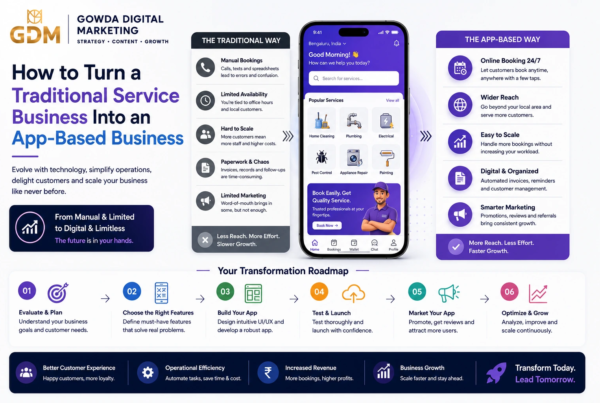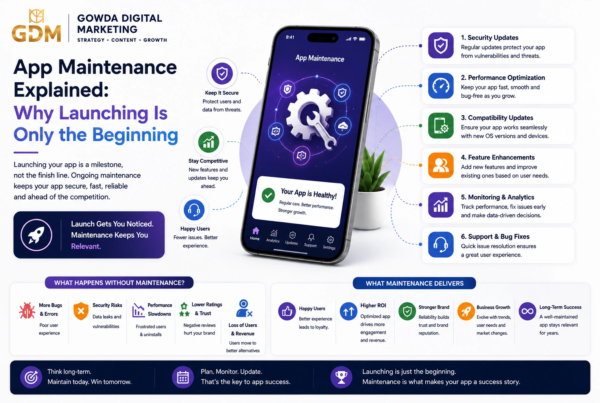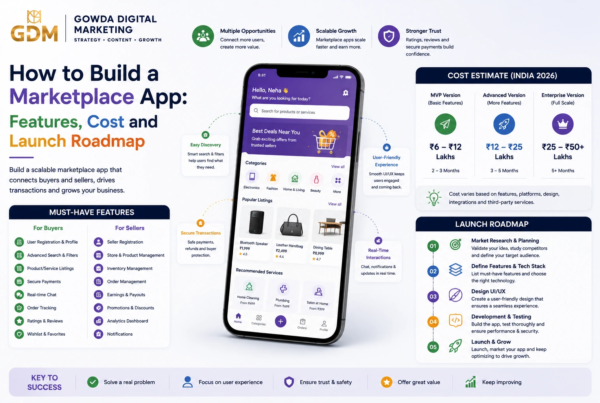

A ₹2 lakh app and a ₹20 lakh app can both be called “mobile apps”—but the difference is what happens behind the screen.
If you are planning to build an app in India in 2026, the first question you will probably ask is: “How much will it cost?”
The problem is that there is no single price.
A basic business app can be relatively affordable, while an e-commerce platform, marketplace, fintech product, healthcare application, or delivery platform can require a much larger investment.
Current Indian pricing guides show a very wide range because projects differ dramatically in scope, architecture, integrations, user roles, design requirements, security and post-launch support. Published 2026 estimates commonly place simple MVPs in the low-lakh range and complex applications anywhere from ₹10 lakh to ₹40 lakh or more.
This guide gives you a practical framework for estimating your budget instead of relying on a random number from an app development company.
Important: The prices in this article are planning estimates, not fixed quotations. Your final cost depends on your exact requirements.
How Much Does Mobile App Development Cost in India in 2026?
A practical 2026 planning range for mobile app development in India is:
| App Type / Complexity | Approx. Development Cost | Typical Timeline |
| Basic app / simple MVP | ₹1.5 lakh – ₹4 lakh | 4–8 weeks |
| Standard business app | ₹4 lakh – ₹10 lakh | 8–16 weeks |
| E-commerce / booking app | ₹6 lakh – ₹15 lakh | 10–20 weeks |
| Marketplace / on-demand app | ₹10 lakh – ₹25 lakh+ | 16–28 weeks |
| Advanced SaaS / fintech / enterprise app | ₹20 lakh – ₹50 lakh+ | 24–52+ weeks |
These ranges are deliberately broad because Indian market pricing varies significantly between freelancers, small development studios and larger software companies. Recent 2026 market guides report comparable ranges, although individual companies publish substantially different price bands.
Featured Snippet: How Much Does an App Cost in India?
Mobile app development in India can cost approximately ₹1.5 lakh to ₹50 lakh or more in 2026. A basic MVP may cost ₹1.5–₹4 lakh, a standard business application around ₹4–₹10 lakh, while complex marketplace, fintech, SaaS and enterprise applications can cost ₹20–₹50 lakh+.
The biggest cost factors are:
- Number of features
- Number of platforms
- UI/UX complexity
- Backend requirements
- Number of user roles
- Third-party integrations
- Security requirements
- Development team
- Testing requirements
- Post-launch maintenance
Key Facts: 2026 App Development Cost
Simple MVP: ₹1.5L–₹4L
Standard app: ₹4L–₹10L
Complex app: ₹10L–₹25L+
Enterprise-grade app: ₹20L–₹50L+
Typical annual maintenance planning: roughly 15–20% of initial development cost, depending on scope and support requirements.
Mobile App Development Cost by Complexity
The easiest way to estimate your budget is to first classify your application.
1. Basic Mobile App
Estimated cost: ₹1.5 lakh – ₹4 lakh
Suitable for:
- Small businesses
- Basic service applications
- Information apps
- Simple directories
- Basic appointment applications
- Internal business tools
- MVPs with limited functionality
A basic application may include:
- 5–10 screens
- Login
- User profile
- Basic database
- Contact form
- Push notifications
- Simple admin panel
The development becomes significantly more expensive once you introduce complex backend logic, multiple user roles or real-time functionality.
2. Standard Business App
Estimated cost: ₹4 lakh – ₹10 lakh
Typical features include:
- User registration
- Profiles
- Search
- Filters
- Notifications
- Payments
- Admin dashboard
- API integration
- Analytics
- Content management
- Cloud database
This is a common category for businesses that want more than a brochure-style mobile application.
3. Advanced Mobile App
Estimated cost: ₹10 lakh – ₹25 lakh+
Examples include:
- E-commerce applications
- Delivery applications
- Booking platforms
- Multi-vendor marketplaces
- Social networking apps
- Learning platforms
- Advanced healthcare applications
- SaaS mobile products
These apps often require multiple user types and more sophisticated backend infrastructure.
4. Enterprise or Highly Complex App
Estimated cost: ₹20 lakh – ₹50 lakh+
Complex projects may involve:
- Multiple applications
- Large databases
- Enterprise APIs
- Advanced analytics
- AI features
- Real-time tracking
- Advanced security
- Multiple integrations
- Complex permission systems
- High availability infrastructure
At this level, development is less about simply creating screens and more about engineering a reliable digital product.
Cost by App Type
Different app categories have very different requirements.
| App Type | Estimated 2026 Cost | Main Cost Drivers |
| Business / informational | ₹1.5L–₹4L | Screens, CMS, notifications |
| Booking app | ₹4L–₹10L | Calendar, availability, payments |
| E-commerce | ₹6L–₹15L | Catalogue, cart, payments, orders |
| Education | ₹5L–₹15L | Courses, video, quizzes, progress |
| Social app | ₹8L–₹20L+ | Feed, chat, media, moderation |
| Delivery app | ₹10L–₹25L+ | GPS, tracking, multiple user roles |
| Marketplace | ₹10L–₹25L+ | Buyers, sellers, payments, admin |
| Fintech | ₹20L–₹50L+ | Security, KYC, compliance, integrations |
| Enterprise | ₹20L–₹50L+ | APIs, permissions, infrastructure |
For example, a delivery application is not simply “one app.” It may involve a customer application, delivery-partner application, admin dashboard, backend, GPS infrastructure, payment processing and notification systems.
That is why comparing its price with a simple five-screen business app can be misleading.
What Factors Affect App Development Cost?
1. Number of Features
More features generally mean more:
- Development hours
- Testing
- UI/UX work
- Backend logic
- API integrations
- Maintenance
A useful approach is to separate features into must-have, should-have and later-stage features.
Example
Instead of launching an e-commerce app with:
- AI recommendations
- Loyalty program
- Advanced analytics
- Multiple payment providers
- Social login
- Referral system
- Live chat
- Subscription system
you might launch version 1 with:
- Product catalogue
- Search
- Cart
- Checkout
- Payment
- Order tracking
Then add advanced functionality after validating demand.
2. Number of User Roles
User roles can have a surprisingly large effect on cost.
For example:
Single-user app
Customer → App → Admin
is considerably simpler than:
Marketplace
Customer → Customer App
Seller → Seller App
Delivery Partner → Delivery App
Admin → Admin Dashboard
Every new role can introduce separate:
- Screens
- Permissions
- Workflows
- Notifications
- Testing scenarios
- Backend logic
3. UI/UX Design
A simple interface costs less to design than a highly customized product experience.
UI/UX costs can increase because of:
- Custom animations
- Complex dashboards
- Interactive components
- Design systems
- Prototypes
- Multiple user journeys
- Accessibility requirements
- Extensive usability testing
Good design is not necessarily about making an app visually complicated.
The goal is to make the important actions easy to understand and complete.
4. Backend Development
This is one of the biggest areas inexperienced buyers underestimate.
Your mobile application may require:
- User authentication
- Database
- APIs
- Cloud storage
- Admin panel
- Payment processing
- Notifications
- Analytics
- Authentication services
- File uploads
- Data synchronization
A visually simple app can therefore have a technically complicated backend.
5. Third-Party Integrations
Integrations can increase both development and testing time.
Common examples include:
- Razorpay
- Stripe
- Google Maps
- Firebase
- SMS gateways
- Email services
- CRM systems
- Accounting software
- Shipping APIs
- AI APIs
The integration itself may not be the biggest expense. Testing edge cases and ensuring that the integration works reliably can add significant effort.
Android vs iOS vs Cross-Platform Cost
One of the biggest decisions is whether to build:
- Android only
- iOS only
- Android + iOS separately
- Android + iOS using cross-platform technology
Native Development
Native Android development generally uses Kotlin/Java, while native iOS development commonly uses Swift.
Native development can make sense when you need:
- Deep platform-specific functionality
- Maximum platform optimization
- Advanced hardware integrations
- Platform-specific user experiences
However, maintaining separate applications can require more development resources.
Cross-Platform Development
Frameworks such as Flutter allow developers to build for Android and iOS from a shared codebase. Flutter’s official documentation describes this single-codebase approach as a way to deploy to multiple platforms.
Practical comparison
| Approach | Cost | Best For |
| Android only | Lower initial cost | Android-focused audiences |
| iOS only | Lower initial cost | iOS-first products |
| Native Android + iOS | Higher | Platform-specific products |
| Flutter / cross-platform | Often lower | Startups and businesses wanting both |
Callout: Cross-platform does not automatically mean “cheap.” Complex platform-specific functionality can still require native development work.
Feature-Wise Cost Breakdown
Instead of asking an agency, “How much does an app cost?”, ask:
“How much will each component cost?”
A typical project may contain:
| Component | Typical Budget Share |
| Discovery & planning | 5–10% |
| UI/UX design | 10–20% |
| Mobile development | 30–45% |
| Backend/API | 15–25% |
| QA/testing | 10–15% |
| Deployment | 3–5% |
| Project management | 5–10% |
These are planning percentages rather than fixed industry rates.
The exact allocation depends on the type of product.
Development Team Cost
You can generally hire through three routes.
Freelancers
Best for: small projects and straightforward MVPs.
Advantages:
- Lower overhead
- Direct communication
- Flexible engagement
Risks:
- Limited availability
- Single-person dependency
- Less structured QA
- Potentially weaker project management
Small Development Agency
Best for: startups and growing businesses.
You may get access to:
- Developer
- Designer
- QA tester
- Project manager
- Technical lead
This can provide a useful balance between price and structure.
Larger Software Company
Best for:
- Enterprise products
- Complex integrations
- Security-sensitive systems
- Large teams
- Long-term product development
The price is generally higher because you are paying for a larger delivery structure and broader capabilities.
Current Clutch listings for Indian app developers show that agency pricing can vary considerably, with some listed providers at 25–49/hour and others using different pricing models.
What Is the Hourly Rate for App Developers in India?
Published 2026 estimates vary by experience and provider. One recent India-focused guide places developer rates approximately around:
| Role | Indicative Hourly Range |
| Junior developer | ₹400–₹700 |
| Mid-level developer | ₹700–₹1,200 |
| Senior developer | ₹1,200–₹2,000 |
| Tech lead / architect | ₹2,000–₹3,500 |
| Senior UI/UX designer | ₹1,000–₹2,000 |
| Senior QA | ₹900–₹1,800 |
These are market indicators rather than universal rates.
A low hourly rate does not necessarily produce a low total project cost.
A developer who takes 500 hours at ₹700/hour costs ₹3.5 lakh.
A more experienced developer taking 300 hours at ₹1,500/hour costs ₹4.5 lakh.
The second option may actually be better if it delivers a more stable product faster.
Hidden Costs You Should Budget For
Your development quote is not necessarily your total first-year cost.
1. App Store Accounts
Google Play currently charges a US$25 one-time registration fee for a Play Console developer account.
Apple’s Developer Program is US$99 per membership year.
2. Hosting and Cloud Infrastructure
Depending on your architecture, you may pay for:
- Servers
- Databases
- Storage
- CDN
- Backups
- Monitoring
- Bandwidth
The cost can start small and increase as your user base grows.
3. API and SaaS Charges
Your app may depend on paid services for:
- SMS
- Maps
- AI
- Payment processing
- Video
- Authentication
Always ask whether these are included in the development quote.
4. Maintenance
A mobile app needs ongoing maintenance.
Budget for:
- Bug fixes
- OS updates
- Security updates
- Dependency upgrades
- New device support
- Store compliance
- Minor improvements
A useful planning benchmark is around 15–20% of the original development cost annually, although actual maintenance can be lower or substantially higher depending on the application.
5. Marketing
Building an app does not automatically create downloads.
You may also need a budget for:
- Google Ads
- Meta Ads
- App Store Optimization
- Influencer marketing
- Content marketing
- SEO
- Referral campaigns
- Email marketing
For many startups, customer acquisition eventually becomes more expensive than the initial development.
Example App Budget
Suppose a local service business wants an appointment booking app.
Required features
- Customer registration
- Login
- Service listing
- Appointment booking
- Payment
- Notifications
- Customer profile
- Admin dashboard
A practical planning budget might look like:
| Work | Example Budget |
| Discovery | ₹30,000 |
| UI/UX | ₹60,000 |
| Mobile development | ₹2,00,000 |
| Backend/API | ₹1,00,000 |
| Admin panel | ₹50,000 |
| QA/testing | ₹40,000 |
| Deployment | ₹20,000 |
| Estimated Total | ₹5,00,000 |
This is an illustrative budget, not a quotation.
If you add:
- Multiple service providers
- Live availability
- Coupons
- Wallet
- Reviews
- GPS
- Chat
- Multi-language support
the project could move into a significantly higher cost bracket.
Step-by-Step App Development Budgeting Process
Use this process before requesting quotations.
Step 1: Define the business problem
Write one sentence:
“This app will help [customer] solve [problem] by [solution].”
Step 2: Identify the primary user
Who is using the app?
- Customer?
- Employee?
- Seller?
- Student?
- Doctor?
- Delivery partner?
Step 3: List every feature
Write everything you want.
Do not worry about the budget yet.
Step 4: Divide features into three groups
MVP
Must exist at launch.
Phase 2
Important but not essential.
Future
Ideas to consider after validation.
Step 5: Choose your platform
Decide between:
- Android
- iOS
- Both
- Cross-platform
Step 6: Define the backend
Ask whether you need:
- User database
- APIs
- Admin panel
- Payments
- Cloud storage
- Notifications
Step 7: Request itemized quotations
Ask every developer to quote the same scope.
Step 8: Compare more than price
Compare:
- Portfolio
- Technology
- Timeline
- QA process
- Communication
- Ownership of source code
- Warranty
- Maintenance
- Security
- Deployment support
Step 9: Keep a contingency budget
Keep approximately 10–20% extra for unexpected scope, technical issues and changes.
Visual: The App Cost Formula
Idea → Features → User Roles → UI/UX → Backend → Development → Testing → Launch → Maintenance
Each additional layer can increase your overall budget.
How to Reduce Mobile App Development Cost
You do not necessarily need to reduce quality to reduce cost.
1. Build an MVP
Start with the smallest version that can test your business idea.
2. Use Cross-Platform Development
If your product does not require highly platform-specific features, a shared-codebase approach can reduce duplicated development work.
3. Avoid Custom Features Too Early
Do you really need:
- AI?
- Advanced animations?
- Multiple payment gateways?
- Complex loyalty programs?
- 10 types of notifications?
Maybe not in version 1.
4. Reuse Proven Components
Using mature libraries and standard UI patterns can reduce development effort.
5. Write a Clear Requirement Document
Ambiguous requirements create change requests.
Clear documentation can save money before development even starts.
What Should You Ask an App Development Company?
Before signing a contract, ask:
- Is UI/UX included?
- Is backend development included?
- Is the admin panel included?
- Is QA included?
- How many revisions are included?
- Is deployment included?
- Who owns the source code?
- Who owns the cloud account?
- Who owns the API accounts?
- Is post-launch support included?
- What happens if the project is delayed?
- What happens when requirements change?
- Are third-party API charges included?
- Is GST included in the quotation?
- What happens after the warranty period?
Red Flag: If a quote only says “complete mobile app – ₹X lakh” without explaining scope, you do not yet have enough information to compare it with another quotation.
Case Study Example: Why the Cheapest Quote Can Become Expensive
Imagine three companies quote for the same booking application:
| Vendor | Initial Quote | What Happens |
| Freelancer A | ₹2.5L | Low price, limited QA |
| Agency B | ₹5L | Design, development, QA included |
| Agency C | ₹8L | Product strategy, QA, DevOps, support |
At first glance, Freelancer A appears to be the obvious choice.
But suppose after launch you need:
- ₹80,000 for missing backend functionality
- ₹50,000 for bug fixing
- ₹40,000 for redesign
- ₹30,000 for deployment problems
Your effective cost becomes ₹4 lakh—and you may have lost time.
This is why total cost of ownership is more important than the cheapest initial quotation.
Expert Opinion: Think Beyond Development Cost
A useful principle when evaluating an app budget is:
“The right question is not ‘How cheaply can we build this app?’ but ‘What is the smallest reliable product we can launch and learn from?’”
That approach is especially useful for startups because it changes the conversation from features to validation.
A strong MVP is not a badly built version of the final product.
It is a deliberately limited product designed to test the most important assumptions.
Mobile App Cost: What You Can Build at Different Budgets
| Budget | What You Can Typically Target |
| ₹1–₹2L | Very basic MVP / limited functionality |
| ₹2–₹5L | Simple business app / basic MVP |
| ₹5–₹10L | Standard business, booking or commerce app |
| ₹10–₹20L | Advanced application / marketplace |
| ₹20–₹40L | Complex platform with multiple roles |
| ₹40L+ | Enterprise, fintech, AI-heavy or highly customized product |
These ranges should be used for budget planning, not as universal price cards. Published Indian 2026 estimates differ widely depending on assumptions and scope.
10 FAQs
1. How much does it cost to develop a mobile app in India in 2026?
A practical planning range is approximately ₹1.5 lakh to ₹50 lakh+. Simple apps are much cheaper, while enterprise, fintech, marketplace and highly customized applications can cost substantially more.
2. What is the minimum cost to build an app in India?
A very basic application may start around ₹1–₹2 lakh when the scope is extremely limited. A more realistic production-ready MVP commonly requires a larger budget.
3. How much does an Android app cost in India?
A simple Android application may cost around ₹1.5–₹4 lakh, while applications with backend systems, payments and advanced functionality can move into the ₹5–₹15 lakh+ range.
4. How much does an iOS app cost in India?
The cost depends mainly on functionality rather than the platform itself. A simple iOS app may fall in a similar broad range to Android, while highly customized applications can cost considerably more.
5. Is Flutter cheaper than native app development?
It can reduce duplicated development work because Flutter supports Android and iOS from a shared codebase. However, the final price depends on functionality, integrations and platform-specific requirements.
6. How long does it take to develop a mobile app?
A simple MVP can take around 4–8 weeks. Standard apps may take 2–4 months, while complex products can take 6–12 months or longer.
7. Does app development include maintenance?
Not always. Some companies include a limited warranty or support period, while ongoing maintenance is billed separately.
8. What is the cost of maintaining a mobile app?
A useful planning benchmark is approximately 15–20% of the initial development cost per year, plus infrastructure and third-party service charges. Actual costs vary significantly.
9. Can I build an app for ₹1 lakh?
Yes, but expectations must be realistic. At that budget, you will generally need a tightly limited feature set, simple UI and minimal backend complexity.
10. Should I build Android and iOS at the same time?
If your target customers use both platforms and your budget allows it, launching on both can make sense. For budget-sensitive MVPs, starting with one platform or using cross-platform development can be more practical.
The Biggest Budget Mistake
Don’t start by asking, “How many screens should the app have?”
Start by asking:
“What is the smallest set of features required to solve the customer’s problem?”
That question can save more money than negotiating a lower developer rate.
Summary: Key Takeaways
Here is the short version:
- ₹1.5L–₹4L: Basic mobile app or tightly scoped MVP
- ₹4L–₹10L: Standard business application
- ₹6L–₹15L: E-commerce, booking and similar applications
- ₹10L–₹25L+: Marketplace and on-demand applications
- ₹20L–₹50L+: Enterprise, fintech and highly complex applications
Your actual cost depends on:
- Features
- User roles
- Platforms
- Backend
- UI/UX
- Integrations
- Security
- Testing
- Maintenance
- Development team
The cheapest quotation is not necessarily the best quotation.
The best app budget is the one that gives you a reliable product, clear ownership and a realistic path to launch.
Conclusion
The question “How much does a mobile app cost in India?” sounds simple, but the answer depends on what you are actually building.
A basic MVP can potentially be built for a few lakh rupees. A standard business application can require several lakhs more. Marketplaces, fintech products, delivery platforms and enterprise applications can quickly move into the ₹20 lakh, ₹30 lakh, ₹40 lakh or higher range.
The smartest approach is not to start with the largest possible feature list.
Start with the smallest reliable version that can solve the customer’s problem and generate real-world feedback.
Define the scope.
Choose the right technology.
Compare itemized quotations.
Budget for maintenance.
And make sure you understand what is included before signing the contract.
If you are planning an app in 2026, your first investment should be clarity—not code.
References & Sources
The pricing figures in this article are presented as 2026 planning estimates and have been cross-checked against multiple published industry sources rather than treated as a single universal rate.
- Clutch — Top App Developers in India
- GoodFirms — Mobile App Development Cost Research
- ZoopCoder — Mobile App Development Cost in India 2026
- Eravue — Mobile App Development Cost in India 2026
- 4AM Tech — Cost to Develop a Mobile App in India 2026
- Flutter — Development and Multi-Platform Apps
- Google Play Console — Developer Account Registration
- Apple Developer Program — Membership
Source note: Development prices are market estimates and can change based on agency size, location, technology, project scope, exchange rates, complexity and business requirements.
Actionable To-Do List
Before contacting an app development company:
- Define the problem your app solves.
- Identify your primary target customer.
- List all desired features.
- Mark features as MVP, Phase 2 or Future.
- Decide Android, iOS or cross-platform.
- Identify required integrations.
- Decide whether an admin panel is required.
- Estimate your first-year maintenance budget.
- Keep a 10–20% contingency.
- Request at least 2–3 itemized quotations.
- Check portfolios and relevant case studies.
- Confirm source-code ownership.
- Confirm hosting and API account ownership.
- Review warranty and maintenance terms.
- Confirm whether taxes and third-party charges are included.
Planning to build a mobile app in India?
Visit gowdadigital.marketing to explore digital solutions and development services for your business.
Subscribe to the Gowda Digital Marketing newsletter for practical guides on websites, mobile apps, SEO, digital marketing and business growth.
And tell us in the comments:
What type of mobile app are you planning to build, and what is your expected budget?
Your answer may help other business owners planning their own app.