
The Complete Local SEO Guide to Increase Google Maps Visibility and Attract More Customers Organically in 2026
When people search for businesses like “digital marketing agency near me,” “printer repair service,” “restaurant near me,” or “interior designer in Bangalore,” the first results they often see are the businesses listed on Google Maps.
Appearing in the top three Google Maps results—commonly known as the Local Pack—can significantly increase your calls, website visits, direction requests, and customer inquiries.
The best part? You don’t need to spend money on Google Ads to achieve strong visibility.
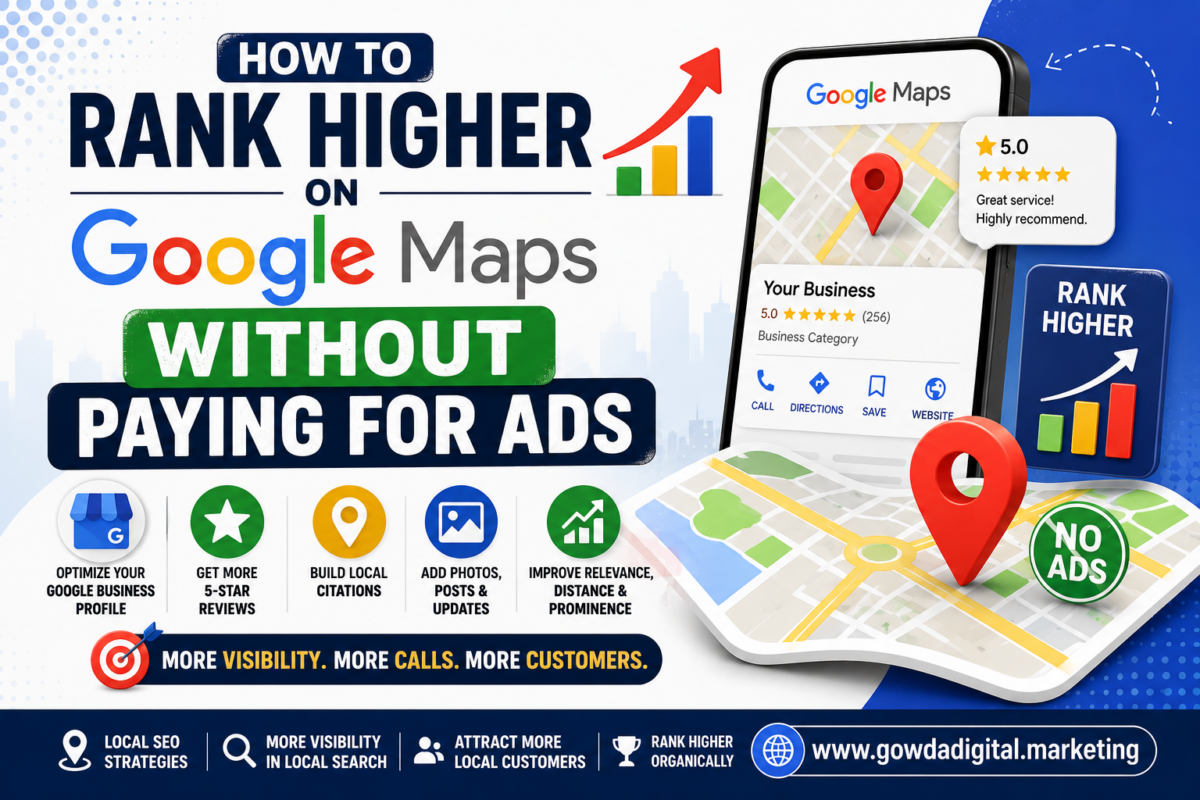
With the right Local SEO strategy, businesses can improve their Google Maps rankings organically by optimizing their Google Business Profile, website, reviews, and local online presence.
In this guide, you’ll learn exactly how to rank higher on Google Maps without paying for ads, helping your business attract more local customers and build long-term visibility.
Why This Matters: The Problem Statement
Many businesses believe they need to run Google Ads to appear on Google Maps.
In reality, poor rankings are often caused by avoidable issues such as:
❌ Incomplete Google Business Profile
❌ Inconsistent business information across the web
❌ Few or low-quality customer reviews
❌ Weak local SEO
❌ Poor website optimization
❌ Lack of local content
❌ Inactive business profile
These factors reduce your chances of appearing in Google’s Local Pack and Google Maps search results.
What You Will Learn
By the end of this guide, you’ll understand:
✅ How Google Maps rankings work
✅ The most important local ranking factors
✅ A complete Google Maps optimization checklist
✅ How reviews influence rankings
✅ Why website SEO affects Maps visibility
✅ Local citation strategies
✅ Common mistakes to avoid
✅ Long-term Local SEO best practices
Table of Contents
- What Is Google Maps SEO?
- How Google Determines Maps Rankings
- Google Maps Ranking Factors
- Complete Google Maps Optimization Checklist
- Optimize Your Google Business Profile
- Build Local Authority
- Improve Website Local SEO
- Get More Customer Reviews
- Local Citations
- Common Mistakes
- Case Studies
- Frequently Asked Questions
- Conclusion
What Is Google Maps SEO?
Google Maps SEO is the process of optimizing your online presence so your business appears higher in Google Maps and the Local Pack for relevant local searches.
Unlike paid advertisements, Google Maps SEO focuses on organic ranking signals such as:
- Relevance
- Distance
- Prominence
- Business information accuracy
- Customer reviews
- Website quality
- Local authority
A well-optimized business profile can continue generating leads without ongoing advertising costs.
Why Google Maps Rankings Matter
Customers searching on Google Maps usually have strong local intent.
Examples include:
- “Best café near me”
- “Laptop repair in Whitefield”
- “Digital marketing agency in Bangalore”
- “Office printer supplier”
- “Emergency plumber nearby”
These searches often lead to immediate actions such as:
- Calling the business
- Requesting directions
- Visiting the website
- Booking appointments
- Making purchases
Ranking well on Google Maps helps you connect with customers who are actively looking for your products or services.
How Google Decides Which Businesses Rank
Google evaluates several factors when determining local rankings.
The three primary signals are:
1. Relevance
Google measures how well your business matches the user’s search.
To improve relevance:
- Choose accurate business categories
- Write detailed service descriptions
- List all products and services
- Use appropriate local keywords naturally
2. Distance
Google considers how close your business is to the searcher’s location.
You can’t control where users search from, but you can clearly define your service areas and maintain accurate address information.
3. Prominence
Prominence reflects how well-known and trusted your business is.
Factors include:
- Customer reviews
- Review quality
- Website authority
- Local backlinks
- Business mentions
- Overall online reputation
Improving prominence strengthens your ability to rank in competitive local markets.
Complete Google Maps Optimization Checklist
✅ Claim and Verify Your Google Business Profile
Your Google Business Profile is the foundation of Google Maps SEO.
Verification confirms your ownership and unlocks important management features.
Benefits include:
- Better visibility
- Greater customer trust
- Access to performance insights
- Ability to respond to reviews
- Product and service management
✅ Choose the Correct Primary Category
Your primary category tells Google what your business does.
Examples:
- Digital Marketing Agency
- Office Equipment Supplier
- Restaurant
- Interior Designer
- Dentist
- Computer Repair Service
Select the category that best represents your main business activity.
✅ Add Relevant Secondary Categories
Secondary categories help Google understand additional services you offer.
For example, a digital marketing company might add:
- SEO Consultant
- Advertising Agency
- Website Designer
- Marketing Consultant
Only include categories that accurately describe your business.
✅ Complete Every Section of Your Profile
Incomplete profiles often perform poorly.
Ensure you add:
- Business name
- Address
- Phone number
- Website
- Business hours
- Business description
- Products
- Services
- Service areas
- Photos
- Videos
- Appointment links (if applicable)
A complete profile provides more information for both users and Google.
Write a Strong Business Description
Your description should clearly explain:
- Who you are
- What you offer
- Who you serve
- Your unique strengths
- Your service locations
Example:
“ABC Digital Marketing helps small and medium-sized businesses grow through SEO, Google Ads, website development, social media marketing, and local SEO services across Bangalore and surrounding areas.”
Write naturally and avoid stuffing keywords.
Add High-Quality Photos
Visual content increases trust and engagement.
Upload:
- Business logo
- Exterior photos
- Interior photos
- Team photos
- Product images
- Service images
- Office workspace
- Customer interactions (with permission)
Use high-resolution images with good lighting.
Update your gallery regularly to keep your profile fresh.
Upload Videos
Videos can help potential customers understand your business.
Ideas include:
- Office tours
- Product demonstrations
- Team introductions
- Service walkthroughs
- Customer testimonials
Short, authentic videos often perform better than overly polished promotional content.
Keep Your Business Hours Updated
Always maintain accurate opening hours.
Update hours for:
- Holidays
- Festivals
- Seasonal schedules
- Temporary closures
Incorrect information can frustrate customers and reduce trust.
Add Your Products and Services
List your offerings directly in your Google Business Profile.
For each product or service, include:
- Name
- Description
- Images
- Pricing (optional)
- Benefits
This helps Google understand your business while giving customers more reasons to choose you.
Enable Messaging
Allow customers to contact your business through Google Business Profile messaging if the feature is available.
Respond promptly to inquiries such as:
- Pricing requests
- Appointment bookings
- Product availability
- Service questions
Quick responses improve customer experience and may encourage more conversions.
Keep Your Profile Active
Google favors businesses that regularly update their profiles.
Publish updates such as:
- New products
- Special offers
- Events
- Company news
- Helpful tips
- Seasonal promotions
Consistent activity signals that your business is active and engaged, which can positively influence local visibility.