
Introduction
Imagine you own a dental clinic in Vijayanagar, a café in Indiranagar, a real estate business in Whitefield, a software company in Koramangala, or a local service business in Bengaluru.
Someone searches Google for:
“dentist near me”
“best café in Indiranagar”
“SEO agency in Bangalore”
“website developer near me”
“digital marketing company Bangalore”
Your potential customer is already looking for something you offer.
The challenge is getting your website, Google Business Profile, product, service page, or content in front of that person at the right moment.
That is where SEO comes in.
SEO is not about tricking Google into ranking your website; it is about making your website easier for search engines to understand and more useful for people to discover, trust and use.
Google’s own SEO Starter Guide describes SEO as helping search engines understand your content while helping users discover your website and decide whether they should visit it.
Why SEO Matters for Businesses
A website can look excellent and still receive very little organic traffic.
Why?
Because building a website and making it discoverable are two different jobs.
A website needs to be:
- Discoverable
- Crawlable
- Understandable
- Relevant to search queries
- Useful to visitors
- Technically accessible
- Easy to navigate
- Credible
- Regularly maintained
For businesses, SEO can help connect existing demand with your products or services.
Instead of interrupting someone with an advertisement, SEO can help your business appear when someone is actively researching a problem or looking for a solution.
For example:
Search: “website development company Bangalore”
A person searching this phrase has already expressed an interest in website development.
A useful service page can explain:
- What you offer
- Who you help
- What the process looks like
- What affects pricing
- What technologies you use
- How long projects generally take
- Common mistakes
- Frequently asked questions
- How someone can contact you
That is fundamentally different from simply putting the word “website” on a page dozens of times.
What Is SEO?
SEO stands for Search Engine Optimization.
It is the process of improving a website and its content so that search engines can better understand it and users can more easily discover and use it through search.
SEO generally involves several connected areas:
- Keyword and search-intent research
- Content creation
- On-page optimization
- Technical SEO
- Internal linking
- Local SEO
- Authority and reputation
- Measurement and improvement
SEO is not one task.
It is a system.
Think of it like this:
Search query → Search engine → Relevant pages → User clicks → User experience → Business outcome
Your goal is to make each part of that journey stronger.
How Does SEO Work?
Before understanding SEO tactics, you need to understand three basic concepts:
1. Crawling
Search engines discover pages by following links and other signals.
Google uses automated systems such as Googlebot to discover publicly accessible pages.
A page that cannot be discovered or accessed properly may have difficulty appearing in search.
2. Indexing
After discovering a page, Google can analyze and store information about it in its index.
Being indexed does not automatically mean the page will rank highly.
3. Ranking and Serving Results
When someone performs a search, Google’s systems determine which results are relevant to the query and should be shown.
The results can vary according to the query, context, location and other factors.
Google specifically states that following its Search Essentials does not guarantee that a page will be crawled, indexed or served in search results.
Simple SEO Flow
Create useful page
↓
Google discovers page
↓
Google crawls page
↓
Google processes and indexes page
↓
Someone searches
↓
Google evaluates relevant results
↓
Your page may appear
↓
User clicks
↓
User reads / compares / contacts / purchases
SEO is therefore much bigger than rankings.
The ultimate objective is to attract the right visitors and help them take meaningful actions.
The Four Main Areas of SEO
A useful beginner framework is to divide SEO into four major areas.
| SEO Area | Main Purpose | Examples |
| Keyword & Content SEO | Match useful content to what people search | Keywords, topics, search intent |
| On-Page SEO | Help search engines and users understand individual pages | Titles, headings, URLs, internal links |
| Technical SEO | Make the website accessible and technically sound | Crawling, indexing, speed, HTTPS |
| Off-Page & Local SEO | Build authority and local visibility | Links, mentions, reviews, Business Profile |
These areas overlap.
For example, a local business may need:
Useful service page + local intent + optimized Business Profile + reviews + strong website + relevant links
Step 1: Define Your SEO Goal
Before researching keywords, define what success means.
Don’t start with:
“I want more traffic.”
Start with:
“I want more qualified people to discover my business and take a useful action.”
Your goal might be:
- More enquiries
- More phone calls
- More WhatsApp enquiries
- More store visits
- More bookings
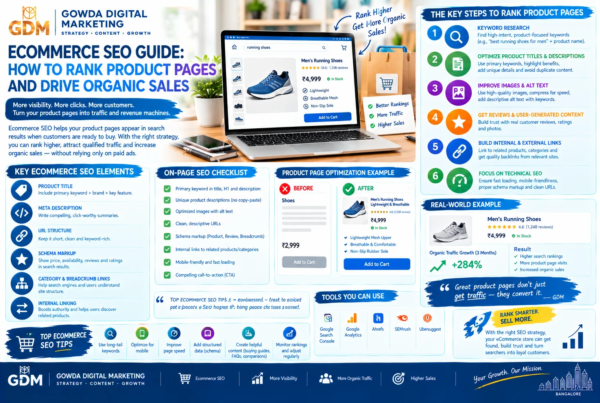
- More ecommerce sales
- More demo requests
- More newsletter subscribers
- More qualified leads
- More brand discovery
Example
A Bangalore dental clinic may care more about:
“dentist consultation bookings”
than:
“10,000 monthly visitors.”
A B2B software company may care about:
qualified demo requests
rather than:
social traffic.
Callout: Traffic Is Not the Final Goal
More traffic is useful only when the traffic is relevant.
A page attracting 5,000 visitors who have no interest in your service may be less commercially useful than a page attracting 300 people who are actively looking for your solution.
Step 2: Understand Search Intent
Search intent is the reason behind a search.
Someone searching:
“what is SEO”
probably wants information.
Someone searching:
“SEO agency Bangalore”
may be researching service providers.
Someone searching:
“SEO package price Bangalore”
may be comparing costs.
Someone searching:
“Gowda Digital Marketing”
is performing a branded search.
Understanding intent helps you create the right page for the right query.
Four Common Types of Search Intent
Informational
The user wants to learn something.
Examples:
- What is SEO?
- How does keyword research work?
- How to improve website speed?
Navigational
The user wants to find a particular website or brand.
Examples:
- Google Search Console
- Gowda Digital Marketing
- Canva login
Commercial Investigation
The user is researching options before making a decision.
Examples:
- Best SEO agencies in Bangalore
- WordPress vs Shopify
- SEO agency pricing
- Best CRM for small businesses
Transactional
The user is ready to take an action.
Examples:
- Buy running shoes
- Book dentist appointment
- Hire website developer Bangalore
Why Intent Matters
If someone searches:
“what is SEO?”
sending them to a sales-heavy pricing page creates a poor experience.
If someone searches:
“SEO services Bangalore”
sending them to a 4,000-word definition of SEO may also fail to meet their immediate need.
The page must match the user’s purpose.
Step 3: Build a Keyword List
Keywords are words and phrases people use when searching.
Start with obvious topics related to your business.
For a digital marketing agency in Bangalore, a basic keyword list might include:
- digital marketing agency Bangalore
- SEO agency Bangalore
- SEO services Bangalore
- local SEO Bangalore
- website development Bangalore
- Google Ads agency Bangalore
- social media marketing Bangalore
- content writing services Bangalore
- business automation Bangalore
Then expand each topic.
Example: SEO
Core term:
SEO
Service terms:
- SEO services
- SEO agency
- SEO consultant
Local terms:
- SEO agency Bangalore
- SEO services Bengaluru
- local SEO Bangalore
Informational terms:
- what is SEO
- SEO basics
- how SEO works
- SEO for beginners
- how to do keyword research
Problem-based terms:
- website not ranking on Google
- low organic traffic
- website not showing on Google
- how to improve Google rankings
This creates a keyword universe rather than a single keyword.
Step 4: Use Keyword Research Tools
Keyword research can begin with simple methods.
Use Google Search
Start typing your topic into Google and examine:
- Autocomplete suggestions
- Related searches
- People Also Ask
- Search result titles
- Featured snippets
- Related topics
These can reveal the language people use.
Use Google Search Console
If your website already receives organic traffic, Search Console can reveal queries for which your site is appearing.
Look at:
- Queries
- Impressions
- Clicks
- CTR
- Average position
- Pages receiving impressions
Search Console is one of the most useful free tools for understanding how your website performs in Google Search. Google’s documentation recommends it for monitoring search performance and checking indexing.
Other Keyword Research Tools
Depending on your budget, you can also use:
- Google Keyword Planner
- Ahrefs
- Semrush
- Ubersuggest
- KeywordTool
- AnswerThePublic
The important principle is not the tool.
It is understanding what your audience is actually trying to accomplish.
Step 5: Choose the Right Keyword for Each Page
One common beginner mistake is trying to rank one page for everything.
Instead, give every important page a primary purpose.
Example Website Structure
| Page | Primary Topic |
| Homepage | Digital marketing agency Bangalore |
| SEO Service | SEO services Bangalore |
| Local SEO | Local SEO Bangalore |
| Website Development | Website development Bangalore |
| Google Ads | Google Ads agency Bangalore |
| Blog | SEO basics for beginners |
| Contact | Digital marketing consultation Bangalore |
This creates a clearer relationship between pages and topics.
Step 6: Create Helpful Content
This is where SEO becomes content marketing.
Google’s SEO Starter Guide emphasizes content that is compelling, useful, unique, readable and maintained over time.
Before publishing an article, ask:
Does it answer the searcher’s question?
Does it provide enough detail?
Is it easier to understand than competing explanations?
Does it demonstrate genuine knowledge?
Does it provide examples?
Does it explain what to do next?
Is the information accurate?
Is it written for people rather than search engines?
If the answer is yes, you’re moving in the right direction.
Step 7: Create a Strong Page Title
Your page title is important because it helps users understand what the page is about.
For example:
Weak:
SEO
Better:
SEO Basics for Beginners: A Complete Step-by-Step Guide
Local service example:
SEO Services in Bangalore for Growing Businesses
Google recommends descriptive, concise titles that accurately represent the page. Google can use multiple sources when generating the title link displayed in search results.
Title Formula
A useful starting framework is:
Primary topic + benefit + qualifier
Example:
SEO Basics for Beginners: A Complete Step-by-Step Guide
Step 8: Write a Useful Meta Description
A meta description summarizes the page.
It may influence what Google displays as the search snippet, although Google can also generate snippets from the actual page content.
Example
Learn SEO from scratch with this beginner-friendly guide covering keyword research, on-page SEO, technical SEO, local SEO, backlinks and measurement.
Good meta descriptions should:
- Describe the actual page
- Be useful to searchers
- Be unique
- Include important context naturally
- Encourage an informed click
Don’t write:
SEO SEO SEO SEO Bangalore SEO services best SEO SEO.
That is not optimization.
That is keyword stuffing.
Step 9: Optimize Your URL
Keep URLs:
- Short
- Descriptive
- Readable
- Relevant
Example
Good:
example.com/seo-basics-for-beginners/
Less useful:
example.com/page?id=2837&cat=seo&ref=123
Avoid changing established URLs unnecessarily.
If you do need to change URLs, plan redirects carefully.
Step 10: Use Headings Properly
Headings help visitors scan your article and understand its structure.
A basic structure could be:
H1: SEO Basics for Beginners
H2: What Is SEO?
H2: How Does SEO Work?
H2: Keyword Research
H3: Understanding Search Intent
H3: Finding Keyword Ideas
H2: On-Page SEO
H2: Technical SEO
H2: Local SEO
The exact heading hierarchy matters less than having a logical, readable structure.
Step 11: Optimize On-Page SEO
On-page SEO refers to improvements you make directly on your page.
Important elements include:
- Page title
- Main heading
- Subheadings
- Body content
- Internal links
- Images
- Alt text
- URLs
- Relevant structured data where appropriate
- Clear navigation
- Descriptive anchor text
Don’t insert keywords into every sentence.
Use natural language and related concepts.
Step 12: Build Internal Links
Internal links connect pages on your own website.
For example, this article about SEO basics could link to:
- SEO services
- Local SEO
- Website development
- Google Business Profile optimization
- Content writing
- Business automation
- Contact page
Google’s SEO documentation notes that links help users and search engines discover and understand related pages.
Example
Instead of:
Click here
Use:
Learn more about local SEO for Bangalore businesses.
The second version gives the reader and search engine more context.
Step 13: Optimize Images
Images can improve comprehension and engagement.
But images should support the content rather than simply decorate the page.
Use:
- Relevant images
- Descriptive filenames
- Appropriate compression
- Useful alt text
- Relevant surrounding text
Google recommends descriptive alt text so search engines can better understand images and their relationship to the page.
Example
Instead of:
IMG1234.jpg
Use:
seo-keyword-research-process.jpg
Alt Text
SEO keyword research process showing search intent, keywords and content planning
Avoid stuffing keywords into alt text.
Step 14: Improve Technical SEO
Technical SEO can sound intimidating, but beginners don’t need to master everything immediately.
Start with the basics.
Your Website Should:
- Use HTTPS
- Be accessible to search engines
- Have crawlable links
- Avoid accidental noindex directives
- Have a logical site structure
- Have a sitemap
- Work properly on mobile devices
- Load efficiently
- Avoid broken important links
- Use appropriate redirects
- Provide useful, accessible content
Google’s Search Essentials describe technical requirements, spam policies and key best practices that websites should follow to be eligible for Search.
Step 15: Understand Core Web Vitals
Core Web Vitals are metrics associated with aspects of page experience such as loading performance, responsiveness and visual stability.
For beginners, the practical objective is simple:
Make your website fast, stable and responsive.
Use tools such as:
- PageSpeed Insights
- Google Search Console
- Chrome DevTools
- Lighthouse
Google recommends using Core Web Vitals reporting and PageSpeed Insights to understand website performance.
Don’t Obsess Over a Perfect Score
A technically perfect score does not automatically make a page the best search result.
SEO is broader than speed scores.
The content still needs to satisfy the user’s need.
Step 16: Make Your Website Mobile-Friendly
Many users access websites from smartphones.
Your website should therefore:
- Adapt to smaller screens
- Have readable text
- Use buttons large enough to tap
- Avoid horizontal scrolling
- Load efficiently
- Make forms easy to complete
- Keep important information accessible
A visitor shouldn’t have to pinch and zoom to discover your phone number.
Step 17: Set Up Google Search Console
Google Search Console should be part of your basic SEO toolkit.
It can help you understand:
- Which pages Google knows about
- Search queries
- Impressions
- Clicks
- CTR
- Average position
- Indexing issues
- Sitemap status
- Search performance
- Certain search appearance data
Beginner Setup
- Create or access your Search Console account.
- Add your website property.
- Verify ownership.
- Submit your sitemap if appropriate.
- Check indexing reports.
- Review search performance.
- Monitor important pages.
- Investigate unexpected drops or indexing problems.
Step 18: Create and Submit an XML Sitemap
An XML sitemap helps communicate important URLs to search engines.
A sitemap isn’t a guarantee that pages will rank or even be indexed, but it can help search engines discover URLs.
For a typical small business website, the sitemap might contain:
- Homepage
- Service pages
- Important category pages
- Blog posts
- Location pages where genuinely appropriate
Avoid treating the sitemap as a replacement for good internal linking.
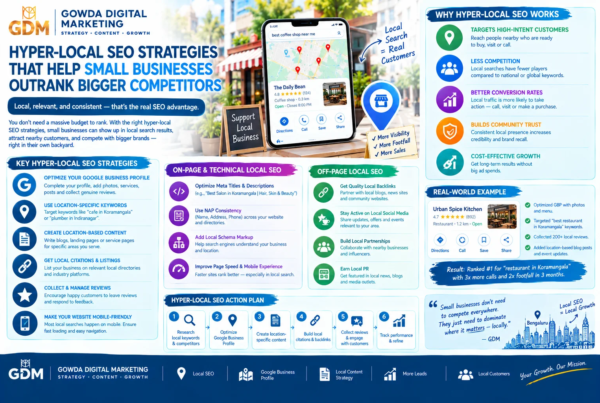
Step 19: Learn Local SEO
If you operate a local business, SEO extends beyond your website.
For Bangalore businesses, local SEO can be particularly relevant for searches such as:
- digital marketing agency Bangalore
- website development Bangalore
- dentist near me
- café in Indiranagar
- gym near me
- accountant Bangalore
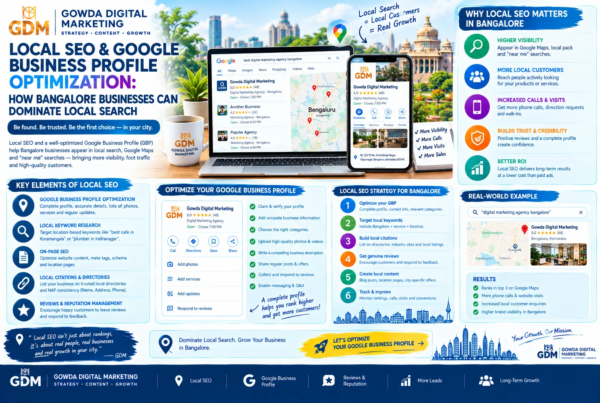
Google says local search results are primarily based on relevance, distance and prominence. Google also recommends keeping Business Profile information complete and accurate.
Local SEO Checklist
Google Business Profile
Make sure your profile has:
- Correct business name
- Accurate address
- Correct phone number
- Relevant primary category
- Appropriate secondary categories
- Business hours
- Website
- Services
- Photos
- Accurate description
Reviews
Encourage genuine customers to leave reviews.
Respond professionally to reviews.
Never manufacture fake reviews.
Local Website Content
Your website can naturally mention:
- Bangalore
- Bengaluru
- Relevant neighbourhoods
- Areas served
- Local customer problems
- Local case studies
- Local service information
Don’t create hundreds of thin location pages simply by replacing one neighbourhood name with another.
Bangalore SEO Example
Imagine a web development company wants customers from Bangalore.
Instead of creating a page that repeatedly says:
Website development Bangalore website developer Bangalore Bangalore website development company…
Create a useful page that explains:
- Website development services
- Types of websites
- Technologies
- Typical project process
- Pricing factors
- Timeline
- Ecommerce options
- Maintenance
- Local business considerations
- Examples
- FAQs
- Contact options
Then naturally include relevant local context.
This provides actual value while also making the page more relevant to local searches.
Step 20: Build Website Authority
Search engines use many signals to understand websites and content.
One part of building a sustainable SEO presence is earning references from relevant websites.
These can include:
- Industry publications
- Business directories
- Associations
- Local publications
- Partner websites
- Relevant blogs
- Community resources
- Genuine editorial mentions
Good Link Building
Focus on earning links because your content is useful or your business is genuinely relevant.
Risky Link Building
Avoid tactics such as:
- Buying large quantities of low-quality links
- Automated link networks
- Spam comments
- Irrelevant directories
- Keyword-stuffed guest posts
- Manipulative link schemes
Google’s Search Essentials include spam policies covering tactics that can result in lower visibility or removal from search.
Step 21: Create a Content Cluster
Instead of publishing unrelated blog posts, build topical depth.
For example, a digital marketing website could have a central SEO page:
SEO Guide
Then supporting articles:
- SEO Basics for Beginners
- Keyword Research Guide
- On-Page SEO Guide
- Technical SEO Checklist
- Local SEO Guide
- Google Business Profile Guide
- SEO Content Writing Guide
- Internal Linking Guide
- SEO Audit Checklist
- SEO Reporting Guide
Connect these articles with internal links.
This creates a logical information structure for users.
Step 22: Measure the Right SEO Metrics
SEO isn’t successful simply because your ranking position increased.
Track several metrics.
| Metric | What It Tells You |
| Organic clicks | Search traffic reaching your site |
| Impressions | How often pages appear |
| CTR | How often searchers click |
| Average position | Approximate visibility in Search Console |
| Organic conversions | Business outcomes |
| Leads | Commercial impact |
| Phone calls | Local/service demand |
| Revenue | Business value |
| Indexed pages | Search availability |
| Engagement metrics | How users interact with pages |
The most important metrics depend on your business.
For a service business:
Organic leads > raw traffic
For ecommerce:
Organic revenue > raw sessions
For a publisher:
Qualified organic readership > impressions alone
Step 23: Understand SEO Conversion
Getting someone to your website is only part of the job.
Your page should make the next step obvious.
Possible calls to action include:
- Request a consultation
- Get a quote
- Book a demo
- Call the business
- WhatsApp the business
- Download a guide
- Subscribe
- View services
- Compare plans
- Make a booking
The CTA should match the visitor’s intent.
A beginner reading an educational guide may prefer:
Download the beginner SEO checklist.
A visitor on a service page may be ready for:
Request an SEO consultation.
Step 24: Create SEO-Friendly Service Pages
A service page should answer practical questions.
For example, an SEO service page can include:
What do you offer?
Explain the service.
Who is it for?
Identify suitable customers.
What problems do you solve?
Discuss common pain points.
What does the process look like?
Show the workflow.
What does SEO include?
Explain deliverables.
How long does SEO take?
Set realistic expectations.
How is success measured?
Explain metrics.
What affects pricing?
Give useful context.
What questions do customers ask?
Add FAQs.
This is more useful than simply writing:
We provide the best SEO services in Bangalore.
Step 25: Use a Simple SEO Workflow
Here is a practical beginner workflow.
SEO Step-by-Step Visual
1. Identify business goal
↓
2. Understand target customer
↓
3. Research search intent
↓
4. Find relevant keywords
↓
5. Map keywords to pages
↓
6. Create useful content
↓
7. Optimize title + headings + URL
↓
8. Add internal links
↓
9. Improve technical SEO
↓
10. Optimize local presence
↓
11. Publish
↓
12. Monitor Search Console
↓
13. Improve based on evidence
↓
14. Repeat
SEO is a cycle rather than a one-time project.
SEO Comparison: Good SEO vs Bad SEO
| Good SEO | Poor SEO |
| Writes for users | Writes mainly for algorithms |
| Uses keywords naturally | Repeats keywords excessively |
| Solves search intent | Targets unrelated keywords |
| Builds useful pages | Creates thin pages |
| Earns relevant links | Buys questionable links |
| Improves site experience | Ignores usability |
| Uses accurate information | Publishes misleading claims |
| Measures conversions | Only watches rankings |
| Updates useful content | Publishes unnecessary rewrites |
| Builds long-term authority | Looks for shortcuts |
SEO Myths Beginners Should Ignore
Myth 1: SEO means putting keywords everywhere
False.
Keywords help describe topics, but repeating them excessively can make content unreadable and may create a poor user experience.
Myth 2: More backlinks always means better rankings
Not necessarily.
Relevance and quality matter.
A small number of genuinely useful references can be more meaningful than thousands of irrelevant links.
Myth 3: SEO delivers instant results
SEO generally requires time.
Google’s own documentation discusses the fact that SEO changes can take time to show impact.
Myth 4: Ranking #1 is the only objective
No.
The business objective is usually something more meaningful:
Visibility → qualified visitor → useful interaction → conversion
Myth 5: You need to publish every day
Not necessarily.
Publishing frequency should depend on:
- Audience needs
- Business objectives
- Available expertise
- Content quality
- Search demand
- Ability to maintain content
One excellent article can be more useful than ten shallow articles.
Myth 6: SEO is finished after publishing
SEO requires ongoing monitoring.
Search behaviour changes.
Competitors publish new content.
Business offerings change.
Old information becomes outdated.
Technical problems can appear.
That’s why SEO should be treated as an ongoing improvement process.
Key Facts & Statistics Box
SEO Facts to Remember
Google accounted for approximately 97.76% of India’s search-engine market share in August 2026 according to StatCounter’s India data. This figure is a market-share measurement, not a guarantee that every Indian user searches through Google.
Google says there is no secret technique that automatically ranks a website first. Its SEO Starter Guide instead emphasizes useful, compelling, well-organized and unique content.
Google’s local search guidance identifies relevance, distance and prominence as the main factors in local results.
Google Search Essentials cover three core areas: technical requirements, spam policies and key best practices.
Expert Perspective: What Google Recommends
Google’s SEO Starter Guide makes an important distinction: SEO isn’t about discovering a secret formula for ranking first.
Instead, the focus is on making a site useful, accessible and understandable.
Google recommends creating compelling and useful content, keeping it readable and well organized, using descriptive titles, making links crawlable, and helping search engines understand images and other content.
That principle provides a strong foundation for beginners:
Build the page a real customer would want to find. Then make sure search engines can understand and discover it.
Case Study Example: A Bangalore Service Business
Consider a fictional Bangalore web development company called ABC Web Studio.
Before SEO:
- Homepage focuses only on company slogans
- Services are barely explained
- No dedicated service pages
- No local information
- Blog is inactive
- Images have generic filenames
- No clear internal linking
- Search Console isn’t monitored
The company decides to build a basic SEO framework.
Month 1: Foundation
They:
- Research customer questions
- Create service pages
- Improve page titles
- Fix important technical issues
- Set up Search Console
- Improve navigation
Month 2–3: Content
They publish useful articles around:
- Website development costs
- Website redesign
- WordPress websites
- Ecommerce websites
- Website maintenance
- Website speed
Month 3–6: Authority & Local SEO
They:
- Improve Business Profile information
- Encourage genuine customer reviews
- Publish local case studies
- Earn relevant business mentions
- Build partnerships
- Continue improving existing content
The important lesson isn’t a guaranteed ranking outcome.
The lesson is the process.
SEO becomes much easier when treated as a structured system rather than a collection of tricks.
Example: SEO for a Bangalore Café
Imagine a café in Indiranagar.
Instead of only targeting:
“café Bangalore”
the business could build content around relevant customer journeys:
- Cafés in Indiranagar
- Coffee near Indiranagar
- Breakfast café in Bangalore
- Work-friendly cafés
- Café for meetings
- Weekend brunch in Indiranagar
- Café with outdoor seating
The business should not create pages simply to target keywords.
Each page should represent a genuinely useful topic, service, product or customer need.
This is an important distinction.
Keyword targeting without usefulness creates thin content.
Keyword research combined with genuine usefulness creates a stronger content strategy.
Local SEO: Website vs Google Business Profile
These two should work together.
| Website SEO | Google Business Profile |
| Service pages | Business information |
| Blog content | Maps visibility |
| Location pages | Reviews |
| Internal links | Photos |
| Technical SEO | Business hours |
| Organic search visibility | Local discovery |
| Long-form resources | Local customer actions |
For a local business, don’t treat them as competing channels.
Use both.
Google states that complete and accurate Business Profile information can help businesses appear for relevant local searches, while local ranking is primarily based on relevance, distance and prominence.
A Beginner’s 30-Day SEO Plan
Days 1–5: Understand Your Website
Audit:
- Pages
- Services
- Navigation
- Titles
- URLs
- Existing content
- Contact information
- Mobile experience
Days 6–10: Research Keywords
Create a spreadsheet containing:
- Keyword
- Search intent
- Topic
- Existing page
- New page required?
- Priority
Days 11–15: Optimize Existing Pages
Improve:
- Titles
- Headings
- Content
- Internal links
- Images
- CTAs
- URLs where necessary
Days 16–20: Fix Technical Basics
Check:
- HTTPS
- Sitemap
- Indexing
- Broken links
- Mobile experience
- Page performance
- Redirects
- Robots directives
Days 21–25: Start Content Strategy
Create:
- One pillar page
- 2–3 supporting articles
- Relevant internal links
Days 26–30: Local + Measurement
For a local business:
- Review Business Profile
- Update information
- Add relevant services
- Improve photos
- Monitor reviews
- Connect Search Console
- Establish baseline metrics
Then continue.
Beginner SEO Checklist
Use this checklist before publishing a page.
Keyword & Intent
- Is the topic relevant?
- Do I understand the search intent?
- Does the page satisfy that intent?
- Is there a clear primary topic?
Content
- Is the content genuinely useful?
- Is it original?
- Is it accurate?
- Is it easy to read?
- Does it answer important questions?
On-Page SEO
- Descriptive title
- Clear H1
- Logical headings
- Useful URL
- Natural keyword usage
- Internal links
- Relevant external references
- Descriptive image alt text
Technical SEO
- HTTPS
- Mobile-friendly
- Crawlable
- Indexable
- Sitemap
- No important broken links
- Reasonable page performance
Local SEO
- Accurate Business Profile
- Correct business information
- Appropriate categories
- Relevant services
- Genuine customer reviews
- Consistent local information
Conversion
- Clear CTA
- Easy contact method
- Useful next step
- Mobile-friendly enquiry process
What is SEO?
SEO, or Search Engine Optimization, is the process of improving a website and its content so search engines can better understand it and users can discover it through organic search results.
SEO includes activities such as keyword research, content creation, on-page optimization, technical improvements, internal linking, local SEO and authority building.
How does SEO work?
SEO works by helping search engines discover, crawl, understand and evaluate web pages so they can potentially be displayed for relevant searches.
The basic process is:
Crawling → Processing/Indexing → Search → Ranking/Serving → Click → User Action
Following SEO best practices does not guarantee a particular ranking or inclusion in Google’s index.
How long does SEO take?
There is no universal SEO timeline.
Results depend on factors such as:
- Website history
- Competition
- Search demand
- Content quality
- Technical condition
- Authority
- Industry
- Location
- Search intent
- Implementation quality
SEO should therefore be approached as a long-term improvement process rather than a guaranteed short-term campaign.
10 FAQs
1. What is SEO in simple words?
SEO means improving your website so search engines can understand it and people can discover it when they search for relevant information, products or services.
In simple terms:
SEO helps the right people find the right page at the right time.
2. Is SEO free?
Organic SEO does not require paying Google for each click.
However, SEO still requires investment in:
- Time
- Content
- Website improvements
- Tools
- Expertise
- Technical work
- Research
A business can perform some SEO activities itself, while more complex websites may require professional support.
3. How long does SEO take to work?
There is no fixed timeline.
A new website in a competitive market may require significant time and effort to establish visibility.
An established website with strong authority may see improvements sooner for some changes.
Google itself notes that SEO changes can take time to have an effect.
4. What are the most important SEO factors for beginners?
Start with fundamentals:
- Helpful content
- Search intent
- Clear page structure
- Descriptive titles
- Crawlable pages
- Internal links
- Technical accessibility
- Mobile usability
- Local SEO where relevant
- Measurement and continuous improvement
5. What is on-page SEO?
On-page SEO refers to optimizing elements on your website pages.
This includes:
- Titles
- Headings
- Content
- URLs
- Images
- Internal links
- Anchor text
- Relevant structured data
6. What is technical SEO?
Technical SEO focuses on helping search engines access, crawl and understand your website.
It can include:
- Crawling
- Indexing
- Site architecture
- HTTPS
- XML sitemaps
- Redirects
- Mobile experience
- Performance
- Structured data
- JavaScript considerations
7. What is local SEO?
Local SEO focuses on improving visibility for searches connected to a specific geographic area.
For example:
“SEO agency Bangalore”
or:
“dentist near me.”
Local SEO can include website optimization, Google Business Profile management, reviews, local content and relevant online mentions.
Google identifies relevance, distance and prominence as key factors in local results.
8. Do I need a blog for SEO?
Not every business needs a large blog.
But useful educational content can help businesses answer customer questions, demonstrate expertise and target relevant informational searches.
A service business may benefit more from strong service pages plus a focused resource section than from publishing dozens of unrelated articles.
9. Are backlinks still important?
Links can help search engines discover pages and provide context and authority signals.
However, chasing large quantities of low-quality links is not a sustainable SEO strategy.
Focus on earning relevant, legitimate references from useful websites.
10. Can I do SEO myself?
Yes.
A beginner can learn and implement many SEO fundamentals.
You can start with:
- Search Console
- Keyword research
- Content optimization
- Internal linking
- Technical checks
- Local SEO
- Performance monitoring
More complex websites may require specialist knowledge in technical SEO, international SEO, ecommerce SEO, migrations or large-scale websites.
SEO Tools Beginners Can Start With
Google Search Console
Use it to monitor search performance and indexing.
Google Analytics
Use analytics tools to understand website behaviour and conversions.
Google Business Profile
Important for businesses serving local customers.
PageSpeed Insights
Useful for understanding page performance.
Google Keyword Planner
Useful for keyword discovery and advertising research.
Screaming Frog
Useful for technical website crawling.
Ahrefs / Semrush
Useful for advanced keyword, competitor and backlink research.
Important Principle
Tools provide data.
They don’t replace judgment.
The most expensive SEO tool cannot compensate for a page that doesn’t solve the visitor’s problem.
A Simple SEO Framework to Remember
If you forget everything else in this guide, remember:
SEARCH
S — Search intent
Understand what people actually want.
E — Experience
Make the website useful, readable and easy to use.
A — Accessibility
Make important content accessible to users and search engines.
R — Relevance
Create pages that genuinely match the topic and audience.
C — Content
Publish useful, accurate and original information.
H — Health & measurement
Maintain technical quality and measure performance.
This isn’t a Google ranking formula.
It is a practical framework for organizing your SEO work.
The Golden Rule of SEO
Don’t ask, “How can I rank this page?”
Ask:
“What would make this page the most useful result for someone searching for this topic?”
Then make sure Google can crawl, understand and discover the page.
Don’t Chase Every Algorithm Update
Search engines continuously evolve.
Instead of trying to predict every ranking change, build fundamentals that remain useful:
- Helpful content
- Strong user experience
- Clear information architecture
- Technical accessibility
- Genuine expertise
- Relevant authority
- Accurate information
- Continuous improvement
Google’s current Search Essentials similarly emphasize people-first content, crawlable links, descriptive content and compliance with spam policies.
Your SEO To-Do List
If you’re starting today, do these in order:
Today
- Identify your top 5 services/products
- Write down customer search questions
- Identify search intent
- Choose one primary keyword/topic for each important page
This Week
- Improve your homepage title
- Improve service page titles
- Fix missing H1s/headings
- Add internal links
- Optimize important images
- Set up Google Search Console
- Check indexing
This Month
- Publish one strong pillar article
- Publish 2–3 supporting articles
- Improve local SEO
- Review Google Business Profile
- Build relevant industry relationships
- Track organic leads
Ongoing
- Monitor Search Console
- Update important content
- Fix technical issues
- Improve underperforming pages
- Build relevant authority
- Measure conversions
6 Key Takeaways
- SEO is about helping search engines understand your website while helping people discover useful content.
- Search intent matters as much as keywords. A page should satisfy what the searcher actually wants.
- Strong SEO starts with fundamentals: useful content, clear titles, logical structure, crawlable pages and good user experience.
- Local businesses need local SEO. For Bangalore businesses, website optimization and Google Business Profile work together.
- SEO is not a one-time task. Monitor performance, improve pages and keep useful information current.
- The real goal is qualified business value, not rankings alone. Traffic should ultimately support enquiries, sales, bookings, subscribers or another meaningful business outcome.
Conclusion
SEO can feel complicated because it combines content, technology, user behaviour, search intent, website structure and marketing.
But the fundamentals are surprisingly straightforward.
Start by understanding what your audience is searching for.
Then create the most useful page you can for that need.
Make the page easy to understand.
Make the website easy for search engines to crawl.
Connect related pages with useful internal links.
Improve your technical foundation.
If you’re a local business, build a strong local presence.
Measure what happens.
Then improve.
You don’t need to master every SEO concept on day one.
You need a process you can repeat.
Understand the search → Create the right page → Optimize it → Make it discoverable → Measure → Improve.
That is the foundation of sustainable SEO.
If this guide helped you understand SEO, subscribe to the Gowda Digital Marketing newsletter for practical guides on SEO, websites, Google Ads, social media, automation and digital growth.
Have a question about SEO?
Leave a comment and tell us what you’re struggling with — keyword research, Google rankings, local SEO, website SEO or technical SEO.
And if you run a business in Bangalore and want to understand where your website currently stands, you can explore a professional SEO audit and identify practical opportunities for improvement.