
Google Business Profile Optimization Checklist for 2026
Is Your Google Business Profile Helping or Hurting Your Business?
Imagine this…
A potential customer searches for “digital marketing agency near me,” “photocopier rental Bangalore,” or “best interior designer in Bangalore.”
Will your business appear at the top of Google Maps?
Or will your competitors get the call instead?
In 2026, your Google Business Profile (GBP) is no longer just a business listing—it’s one of the most powerful local marketing tools available. A well-optimized profile can generate phone calls, website visits, direction requests, reviews, and even direct sales without spending money on paid advertising.
Whether you’re a local shop, service provider, healthcare clinic, restaurant, or digital agency, optimizing your Google Business Profile should be one of your highest marketing priorities.
This complete optimization checklist walks you through every important step to improve your local rankings and stay ahead of competitors in 2026.
Why Google Business Profile Matters in 2026
Consumer behavior has changed dramatically over the last few years.
Instead of browsing multiple websites, customers often make purchasing decisions directly from Google Search or Google Maps.
A complete Google Business Profile allows potential customers to instantly find:
- Business information
- Contact details
- Directions
- Reviews
- Photos
- Products
- Services
- Website
- Business hours
- Frequently asked questions
Google’s AI-powered search results also rely heavily on complete and trustworthy business profiles to recommend local businesses.
The more optimized your profile is, the better your chances of appearing in:
- Google Search
- Google Maps
- Local Pack (Top 3 Results)
- AI Overviews
- Voice Search
- “Near Me” searches
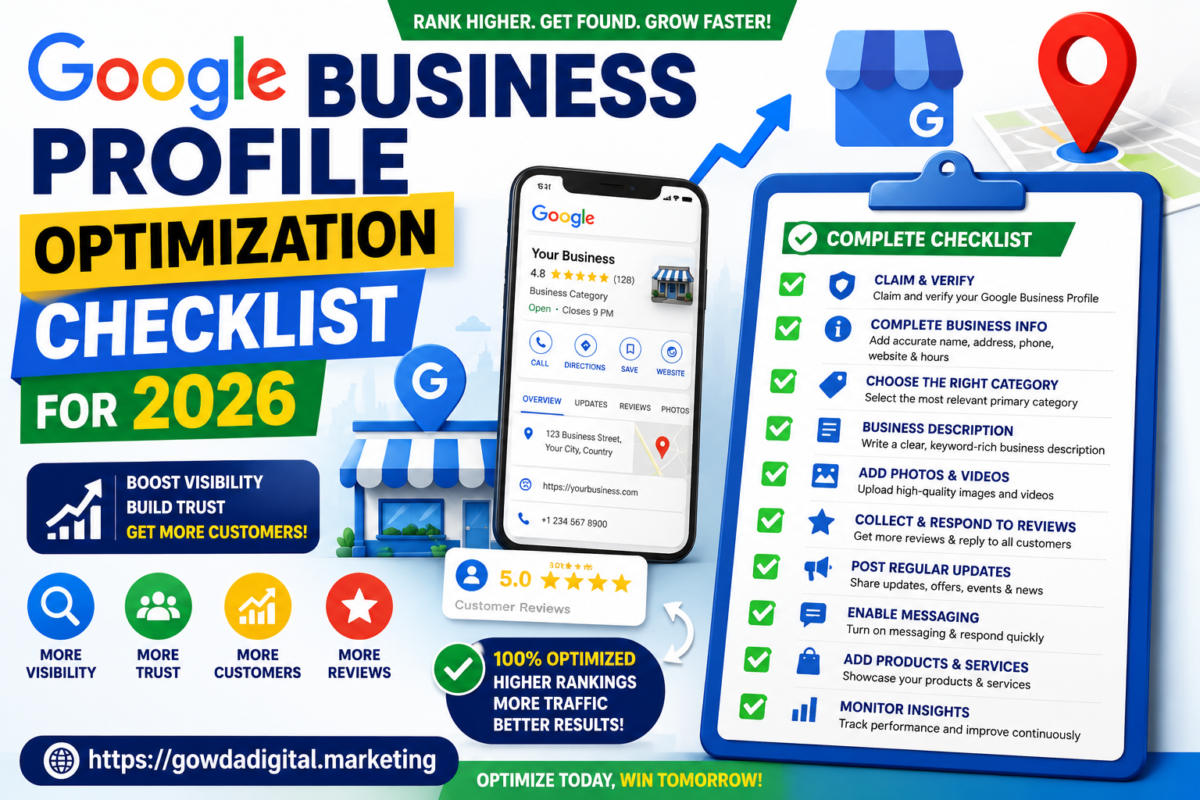
Google Business Profile Optimization Checklist
1. Claim and Verify Your Business Profile
If you haven’t claimed your profile yet, this should be your first step.
Verification tells Google that your business is legitimate.
Benefits include:
- Higher trust
- Better visibility
- Access to profile management
- Customer messaging
- Performance insights
2. Complete Every Business Information Field
Never leave important fields blank.
Complete:
- Business Name
- Address
- Phone Number
- Website
- Business Hours
- Holiday Hours
- Service Areas
- Opening Date
- Business Attributes
Google prefers complete profiles over incomplete listings.
3. Keep Your NAP Information Consistent
NAP stands for:
- Name
- Address
- Phone Number
Ensure these details are identical across:
- Website
- Google Business Profile
- Business directories
- Local citations
Consistency improves trust and local rankings.
4. Choose the Right Business Categories
Your primary category is one of the strongest local ranking factors.
Examples:
Digital Marketing Agency
Interior Designer
Printer Repair Service
Photocopier Rental Service
Restaurant
Real Estate Consultant
Dental Clinic
Gym
You can also add multiple secondary categories to help Google better understand your services.
5. Write an SEO-Friendly Business Description
Your description should clearly explain:
- Who you are
- What you offer
- Areas you serve
- Why customers choose you
Include naturally placed local keywords.
Example:
“We provide professional digital marketing services in Bangalore including SEO, Google Ads, Meta Ads, website development, and local SEO solutions for businesses of all sizes.”
6. Add Every Service You Offer
Many businesses miss this opportunity.
Create individual service listings for every service.
Example:
Digital Marketing
- SEO
- Local SEO
- Google Ads
- Meta Ads
- Social Media Marketing
- Website Development
- Content Marketing
- AI Marketing
This improves keyword relevance.
7. Upload High-Quality Photos
Businesses with more photos usually receive more customer engagement.
Recommended images:
- Business Exterior
- Business Interior
- Team Photos
- Products
- Services
- Office
- Equipment
- Customer Experience
- Before & After Images
Update photos regularly.
8. Upload Videos
Videos help customers trust your business faster.
Ideas include:
- Office tour
- Customer testimonials
- Team introduction
- Product demonstrations
- Service walkthroughs
Short videos perform best.
9. Collect Customer Reviews Regularly
Reviews remain one of Google’s strongest local ranking signals.
Ask every satisfied customer for a review.
Good reviews improve:
- Rankings
- Trust
- Click-through rate
- Conversions
Create a review request process after every completed service.
✅ 10. Respond to Every Review
Google likes active businesses.
Respond to:
- Positive reviews
- Neutral reviews
- Negative reviews
Professional responses show that your business values customer feedback.
11. Publish Google Posts Weekly
Google Posts keep your profile active.
Post:
- Offers
- Promotions
- Blogs
- Events
- Product launches
- Company updates
- Seasonal campaigns
Weekly posting signals an active business.
12. Add Products
If you sell products, showcase them directly on your profile.
Include:
- Product Name
- Description
- Price
- Image
- CTA Button
This improves visibility in Google Shopping and local searches.
13. Enable Messaging
Allow customers to message you directly.
Benefits:
- Faster communication
- More inquiries
- Better customer experience
- Higher conversion rates
Respond quickly to maintain trust.
14. Keep Business Hours Updated
Incorrect business hours frustrate customers.
Update:
- Holidays
- Festivals
- Temporary closures
- Special working hours
Accurate information builds credibility.
15. Answer Questions in the Q&A Section
Many businesses ignore Google Questions & Answers.
Monitor and answer questions promptly.
Examples:
Do you offer same-day service?
Do you provide free consultations?
Do you have parking?
Can I book online?
Helpful answers improve customer confidence.
16. Add Attributes
Business attributes help customers make decisions.
Examples:
- Wheelchair Accessible
- Free Wi-Fi
- Online Appointments
- Women-Owned
- Family Friendly
- Outdoor Seating
- Delivery Available
Choose every relevant attribute.
17. Monitor Google Business Profile Insights
Review monthly performance data.
Track:
- Profile views
- Calls
- Website visits
- Direction requests
- Search queries
- Photo views
Use this information to improve your local SEO strategy.
Common Google Business Profile Mistakes
Avoid these common mistakes:
❌ Incomplete profile
❌ Wrong business category
❌ Keyword stuffing
❌ Fake reviews
❌ Low-quality images
❌ Outdated business hours
❌ Ignoring customer reviews
❌ Never posting updates
❌ Incorrect contact information
Google Business Profile Ranking Factors in 2026
Google mainly considers:
Relevance
How closely your business matches the search.
Distance
How close your business is to the customer.
Prominence
How well-known and trusted your business is based on reviews, citations, backlinks, and online reputation.
Pro Tips for Better Local Rankings
✔ Publish one Google Post every week.
✔ Upload new photos every month.
✔ Request reviews consistently.
✔ Keep your profile updated.
✔ Add all available services.
✔ Respond to reviews within 24 hours.
✔ Optimize your website for local SEO.
✔ Build local backlinks.
✔ Use location-specific keywords naturally.
Frequently Asked Questions
Is Google Business Profile free?
Yes. Creating and managing a Google Business Profile is completely free.
How often should I update my profile?
At least once every week.
Do reviews improve rankings?
Yes. Reviews are one of the most important local SEO ranking factors.
How many photos should I upload?
Aim for at least 30–50 high-quality images and continue adding new ones regularly.
Can I rank without a website?
Yes, but having a well-optimized website significantly improves your visibility.
Are Google Posts important?
Yes. Regular posts show Google that your business is active.
How long does it take to improve rankings?
Most businesses see improvements within a few weeks to a few months, depending on competition and optimization.
Final Thoughts
Google Business Profile is one of the highest-ROI marketing tools available for local businesses in 2026.
Businesses that actively optimize their profiles, publish updates, collect reviews, and provide accurate information consistently outperform competitors in Google Search and Google Maps.
If you want more local customers, more phone calls, more website visitors, and more leads, start by optimizing your Google Business Profile today.
A complete profile isn’t just good for local SEO—it’s essential for building trust and staying visible in Google’s AI-powered search experience.
Key Takeaways
- Claim and verify your profile.
- Complete every business information field.
- Use accurate business categories.
- Add all services and products.
- Upload high-quality photos and videos.
- Collect and respond to customer reviews.
- Publish Google Posts every week.
- Monitor profile insights regularly.
- Keep business details updated.
- Combine Google Business Profile optimization with local SEO for the best results.